
[Updated for 2026] Keep2Share is one of the more reliable overseas file hosts, a file hosting service that supports long-term storage of large files and stable download speeds.
This article explains how to register a Keep2Share account, how to buy a Premium plan and how downloading actually works, in a way beginners can follow.
For those wondering “Is Keep2Share safe to use?” or “What are the benefits of a Premium plan?”, it covers everything from payment methods and traffic limits to things to watch out for and frequently asked questions.
After reading this article, you will have everything ready to start using Keep2Share smoothly.
Official URL: k2s.cc
New to File Hosting Services?
File hosting services have their own rules and risks, and there are several points to be careful about.
The basics, the risks, and the precautions are explained in detail in the article below.

Premium Plan Pricing and How to Choose
Keep2Share offers the following three types of Premium plan to suit different needs.
- Premium (standard)
- Premium PRO
- Premium MAX
Each one has progressively more download traffic and features, and the prices differ as well.
Feature comparison by plan
| Plan | Daily traffic | Main features |
|---|---|---|
| Premium | 10 GB/day | High-speed downloads, virus check, ad-free experience and more |
| Premium PRO | 50 GB/day | All Premium features plus online video viewing |
| Premium MAX | 100 GB/day | All PRO features plus dedicated high-speed servers and priority support |
Premium pricing
| Days | Premium | Premium PRO | Premium MAX |
|---|---|---|---|
| 30 days | $23.94 | $29.94 | $39.99 |
| 90 days | $59.94 | $71.94 | $96.11 |
| 365 days | $199.95 | $249.95 | $309.95 |
Which plan is recommended?
| Purpose / how you use it | Recommended plan |
|---|---|
| Small downloads / value for money | Premium (standard) |
| Want to watch videos in the browser | Premium PRO |
| Need maximum speed and volume | Premium MAX |
With Keep2Share Premium plans, the right plan depends on what you want to use and how much.
- Premium if you only use it occasionally
- PRO if you want to watch videos directly
- MAX if you want large volume and heavy daily use
The longer the subscription, the lower the cost per day, so the 365-day plan is good value if you plan to use it long term.
How to Buy a Premium Account
Create an Account
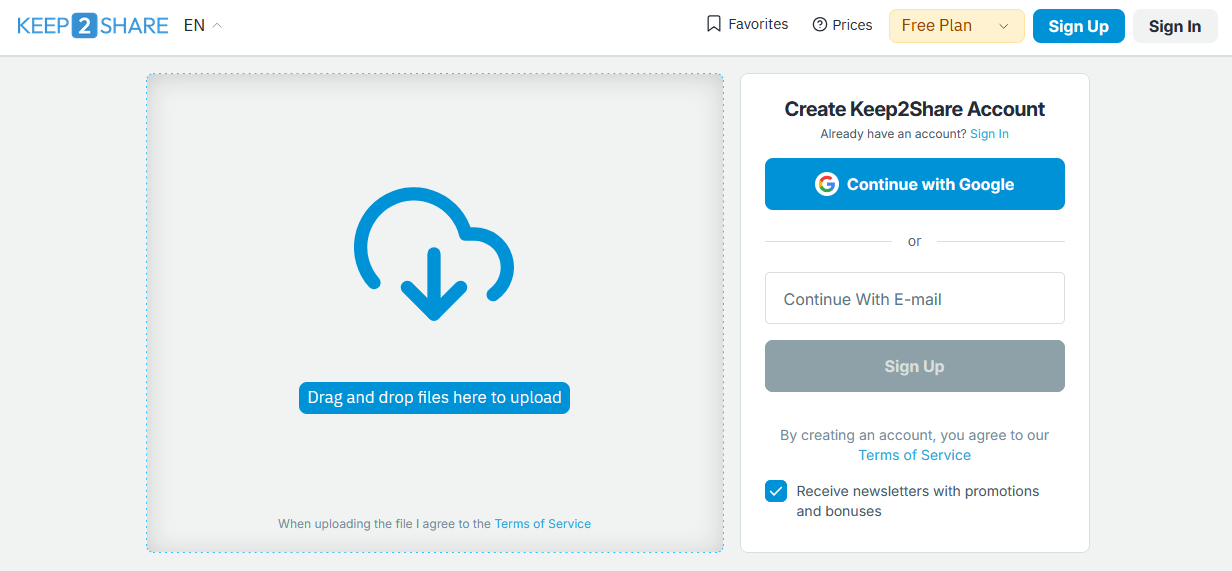
Create an account from Keep2Share.

Click “Sign Up” in the top menu.
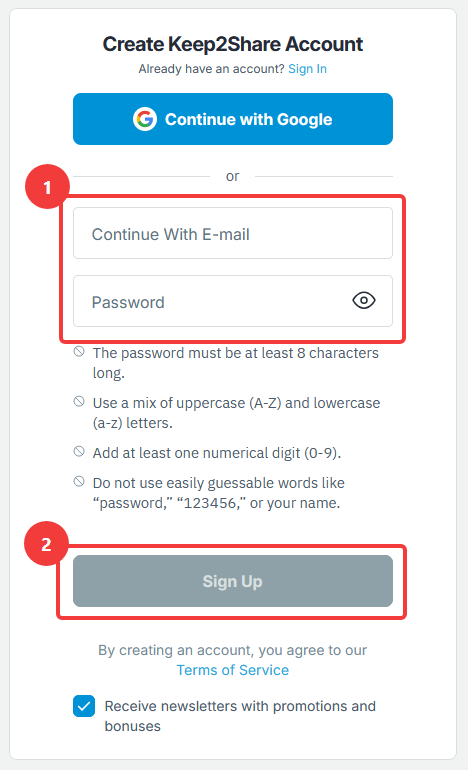
Enter your “email address” and “password“, then click “Sign Up“.
Your Keep2Share account is now created.
Buy Premium
If you would rather not enter personal information on an overseas site, or you want to pay in Japanese and in Japanese yen, “Preaka.JP” is a good option. It accepts credit cards as well as Google Pay and various other payment methods. Note that Preaka.JP restricts purchases made from outside Japan.
Go to the purchase page from Keep2Share.
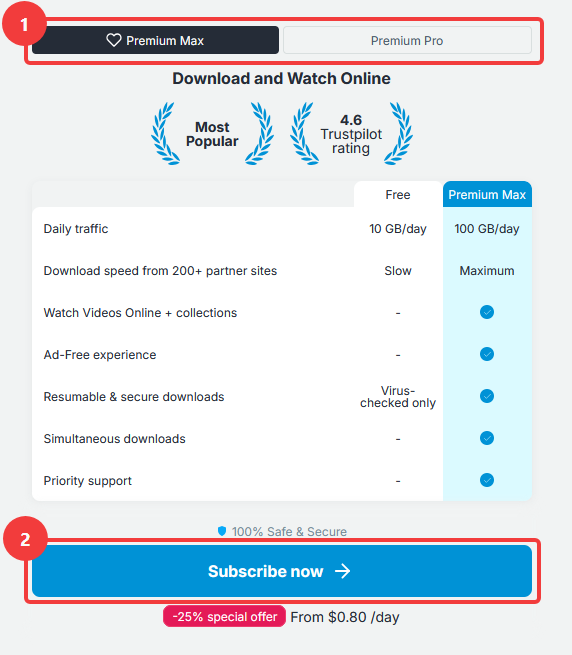
Select the plan you want with the tabs at the top and click Subscribe now.
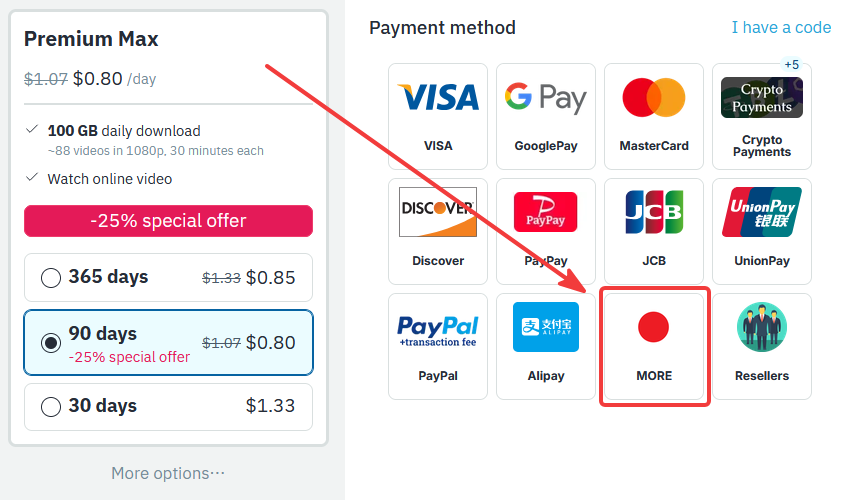
Click MORE.
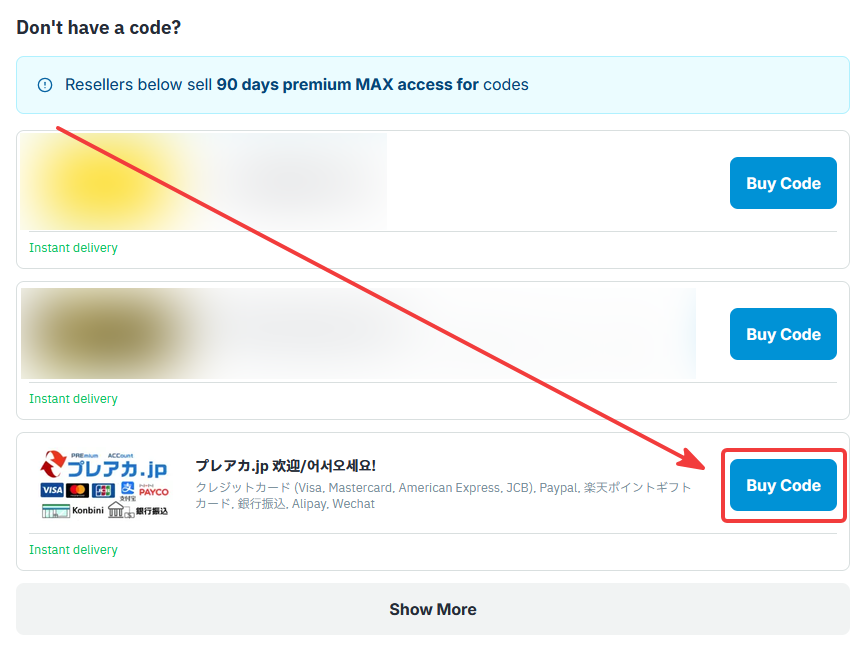
Preaka.JP is shown. Click Buy Code.
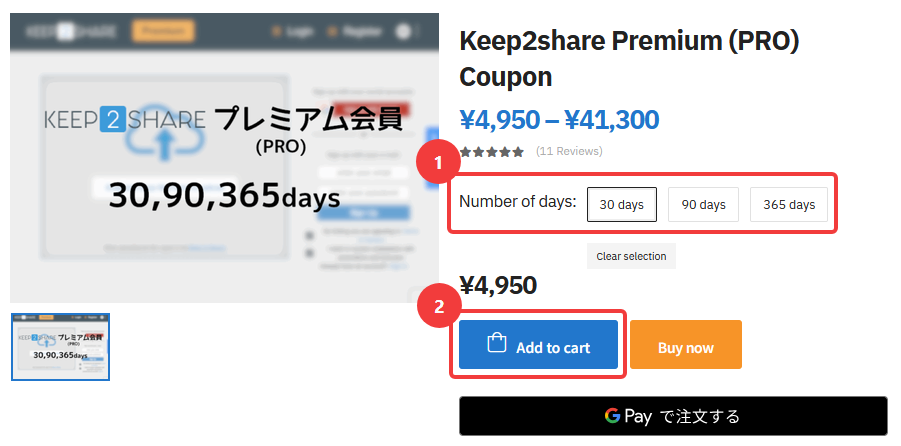
Select the number of days you want and click Add to cart.
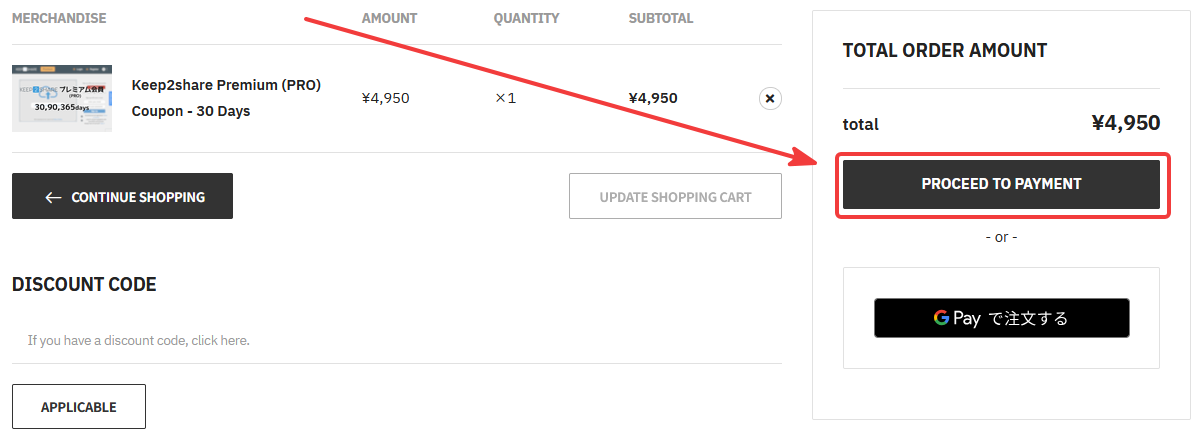
Go to the cart and click “Proceed to payment“.
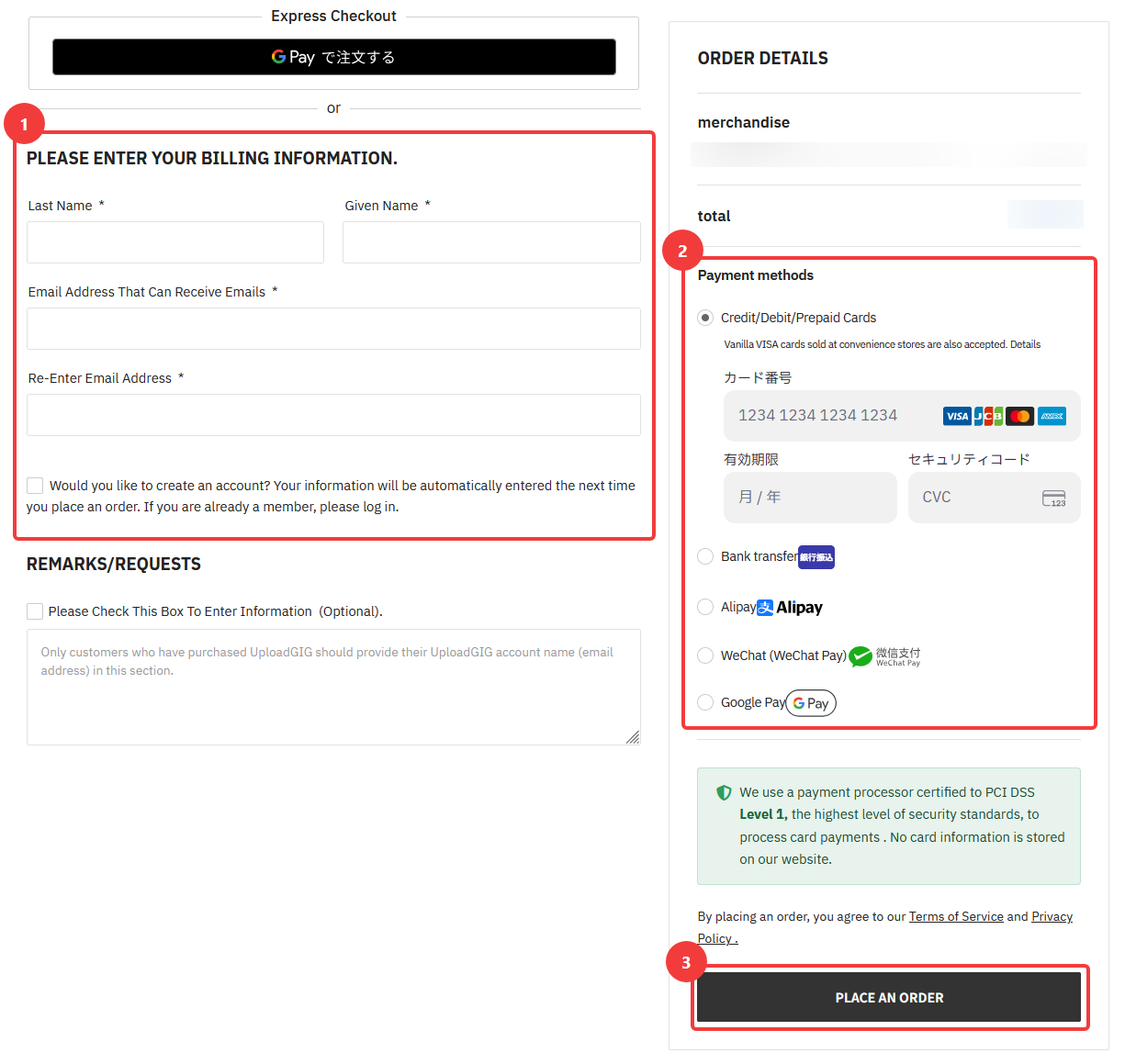
Enter your name and email address under PLEASE ENTER YOUR BILLING INFORMATION, choose a payment method, and click Place an order.
You can choose from a range of payment methods, including credit cards, prepaid cards and bank transfer.
No credit card? No problem. With a prepaid card sold at convenience stores in Japan, such as Vanilla Visa or Bandle Card, you can buy a Premium coupon through credit card payment. How to choose and use these cards is explained in How to Buy Premium with a Prepaid Card.

When payment is complete, the Keep2Share Premium coupon is sent to the email address you registered.
Delivery takes 5 minutes to 24 hours, but in our experience it almost always arrives within 30 minutes.
With card payment it often arrives within a few minutes. With bank transfer, it is sent after your payment has been confirmed.
How to Use a Premium Coupon
Go to the Keep2Share coupon activation page.
Select the plan you bought and click Subscribe now.
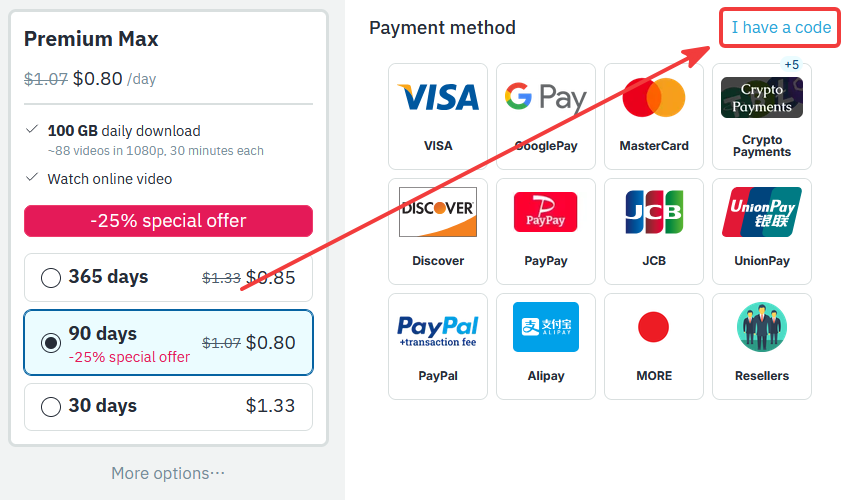
A list of plans is shown. Click I have a code at the top right.

A Reseller Code field is shown. Enter your Premium coupon there and click Activate.
Your Keep2Share account is now Premium.
How to Download Files
Open the file URL.

Click Download now and the download starts.
Online video viewing
Keep2Share has an online video viewing feature, so video files can be played in the browser.
It is handy because you can check the contents without downloading.
How to Enable Direct Download
With direct download enabled, simply clicking a link downloads the file without opening the Keep2Share download page.

On the Keep2Share site, go to Profile, then Account information, tick Enable Direct Download and click Save.
By the way, Hide recommended video is a setting that hides recommended videos.
It is not clear where they would appear, but I keep them hidden.
Recommended Tools for File Hosting Services
When you use a file hosting service, your IP address is passed directly to the other party’s server, so it is worth taking security measures as well.
Also, a dedicated download tool is far more efficient than downloading in your browser.
If you find it tedious to click the download button and wait every time, or feel uneasy about using overseas sites as they are, see “Recommended Tools for File Hosting Services“. It summarizes the standard tools that heavy users rely on, organized by purpose.

Frequently asked questions (FAQ)
Does it renew automatically?
Keep2Share Premium does not renew automatically.
When the Premium period ends, the account simply goes back to the free plan.
What if I can’t download?
Free users have a limit on parallel downloads, so once a download is recognised as started, you have to wait a certain time before downloading the next file.
Apart from deleted files, buying Premium greatly relaxes the restrictions above.
How much can I download per day?
Keep2Share has no speed limit, but the amount of traffic you can download is fixed.
- Premium MAX → 100GB
- Premium PRO → 50GB
- Premium → 10GB
How fast are downloads?
Download speed varies with the time of day, but when I tried downloading during the busy evening hours, I got speeds of 1 MB to 10 MB per second.

What if downloads are slow?
Keep2Share downloads are fast, but occasionally the speed drops depending on the time of day or the distance to the server.
If downloads are slow, trying a different time of day, or switching country if you use a VPN, sometimes helps.
Can I use a PLG (Premium Link Generator)?
There is no PLG (premium link generator) we can recommend for Keep2Share. Considering download traffic and speed, buying directly from the official site is more stable.
Buying from the official site also supports the file host and should help keep the service running.
Is it OK to buy from a reseller?
There are quite a lot of Keep2Share resellers, both in Japan and overseas. If you want to deal in Japanese or do not want to hand your details to an overseas site, using a reseller is a reassuring option.
Also, be careful with “Premium accounts” sold cheaply on auction sites. In many cases one account is shared among several people, and you may suddenly be unable to log in or the account may be suspended. Buy the proper way, by applying a coupon to your own account.
For a reseller in Japan, we recommend Preaka.JP.
Both the site and support are in Japanese, and besides credit cards it accepts prepaid cards sold at convenience stores and bank transfer. You buy at the price shown in Japanese yen, so there is no need to worry about exchange rates or foreign transaction fees.
How to use it and how to buy are explained in detail in the article below.
Is Keep2Share safe? Is it illegal?
Keep2Share is a platform for storing and sharing files, and it is operated legally.
However, some users upload and share copyrighted works without the rights holder’s permission, and that is illegal. Downloading something you know was uploaded illegally is also illegal, so do not misuse the service.
Summary
I bought a Keep2Share Premium account and tried it out.
As a popular file host, everything from creating an account to going Premium was simple and easy to follow.
Keep2Share is a file host where you can download 10 GB to 100 GB per day, depending on the plan. With Premium PRO or above you can also use online video viewing. Premium does not renew automatically, so being able to use it casually for just the period you need is another attraction.
If you want to buy in Japanese and in Japanese yen, Preaka.JP lets you go Premium without entering personal information on an overseas site. Even without a credit card, you can buy with a prepaid card sold at convenience stores.
If anything is unclear, feel free to ask in the comments. I will answer as best I can.
Official site: Keep2Share





コメント