

“I want to buy Premium for an overseas file host, but I don’t have a credit card…”
“I’m uneasy about entering card details on an overseas site…”
Even so, with a prepaid card sold at convenience stores in Japan, you can buy Premium for overseas file hosts without a credit card.
At Preaka.JP, an authorized seller in Japan, you can buy Premium coupons in Japanese and in Japanese yen, and you can pay with a prepaid card instead of a credit card.
This article explains the features of four prepaid cards that are easy to buy at convenience stores, how to choose between them, and the steps up to actually buying Premium, in a way beginners can follow.
Besides questions such as “Which prepaid card should I choose?” and “What do I do with leftover balance?”, it also covers things to watch out for when buying.
After reading this article, you can get Premium without a credit card and without getting lost.
- How you can buy without a credit card
- Four prepaid cards you can use instead of a credit card
- Which one is recommended? How to choose by purpose
- Extra: what to do with leftover balance
- Frequently asked questions
- Main file hosts you can buy for on Preaka.JP
- Summary
How you can buy without a credit card
Most prepaid cards sold at convenience stores carry an international brand such as Visa or Mastercard.
When you buy a card and load it, a card number, expiry date and security code are issued. Enter these on the payment screen just as you would a credit card, and you can use them to pay for online shopping.
A prepaid card works by loading money first and then spending it. So no screening or bank account registration is needed, unlike a credit card, and there is no risk of spending more than you loaded.
Preaka.JP accepts credit card payment, so you can buy Premium coupons with these prepaid cards.
Four prepaid cards you can use instead of a credit card
There are several prepaid cards you can use instead of a credit card, but here we introduce four that are easy to buy at convenience stores. The amounts you can buy and the shops that sell them differ, so choose the one that suits you.
Vanilla Visa Gift Card
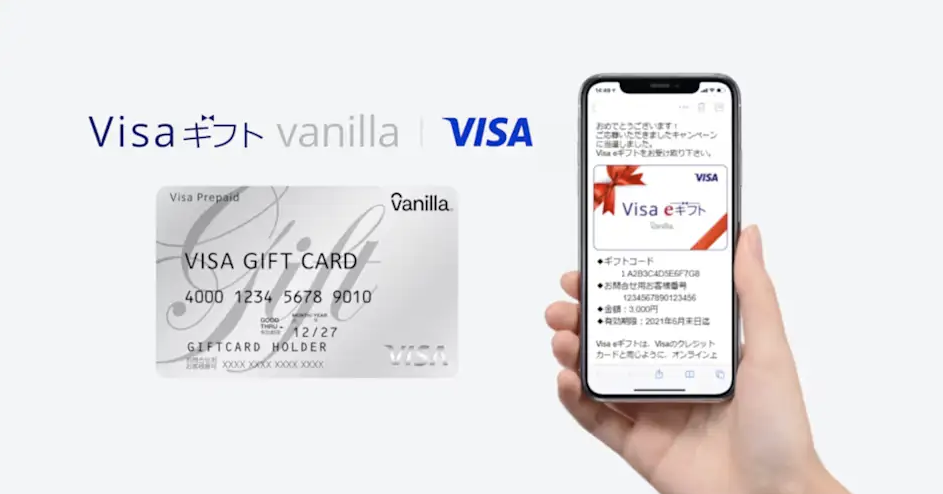
Features of the Vanilla Visa Gift Card
The Vanilla Visa Gift Card is a prepaid card you can buy at convenience stores such as FamilyMart, 7-Eleven and Ministop, and at shops such as Welcia and Ito-Yokado. It carries the Visa mark, so you can use it to pay at online shops that accept Visa.
Its key feature is that you can buy it for an amount specified to the yen. Officially you can buy from 3,000 to 100,000 yen, and because the amount is not fixed at “1,000 yen” or “5,000 yen” like other prepaid cards, you can load exactly the price of the Premium coupon you want, with no balance left over.
A fee of 5% of the purchase amount normally applies, but as of November 2026 a no-fee campaign is running.
It used to require activation by SMS after purchase, but since 2023 that is no longer needed, and you can use it as soon as you buy it.
What you need
- A shop that sells the Vanilla Visa Gift Card
- Cash for the amount of the coupon you want to buy
Buying Premium with Vanilla Visa
As an example, buying a 3,750 yen Premium coupon goes like this.
- Go to a shop that sells Vanilla Visa, such as FamilyMart
- Take the card to the register, ask for 3,750 yen and buy it
- On Preaka.JP, choose credit card payment as the payment method, enter the Vanilla Visa card details and place the order
Things to watch out for
The minimum purchase is 3,000 yen. If you buy a coupon under 3,000 yen, you will have balance left over, but you can use the remainder at shops and online stores that accept Visa.
On Preaka.JP, the payment limit per Vanilla Visa card is 10,000 yen. If you want to buy a coupon over 10,000 yen, Preaka.JP’s split payment lets you pay across several Vanilla Visa cards. The steps are shown next.
Use split payment for amounts over 10,000 yen
Preaka.JP has a split payment feature that lets you pay with several low-limit cards such as Vanilla Visa. You need a registered Preaka.JP account to use it.
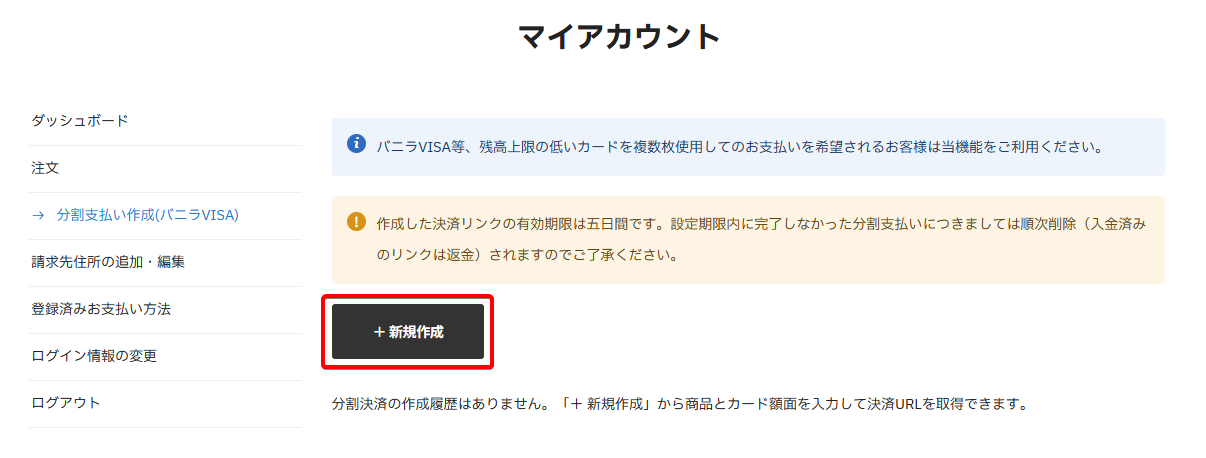
Log in to Preaka.JP, open the split payment page and click + Create new.
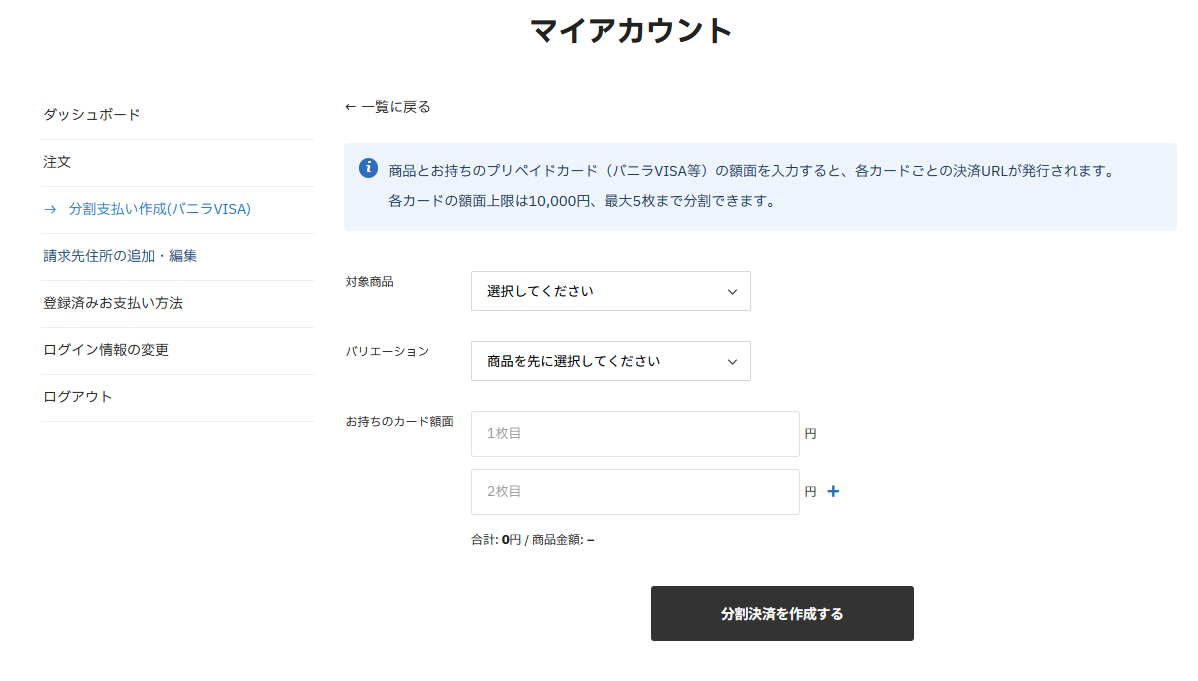
Choose the coupon and number of days you want under the product and variation fields, then enter the amount of each Vanilla Visa card you have, one per field. If you want to split across three or more cards, add fields with the + button.
When the total of the card amounts matches the product price, click the button to create the split payment. A payment URL is issued for each card, so enter the Vanilla Visa card details at each URL to complete the payment.
(Example) For a 10,700 yen coupon → two cards of 5,000 yen and 5,700 yen
(Example) For a 20,500 yen coupon → three cards of 10,000, 5,000 and 5,500 yen
You can split into up to 10,000 yen per card and up to 5 cards. The payment URLs are valid for 5 days, and if all payments are not completed within that time, the order is cancelled and what you have paid is refunded.
Bandle Card
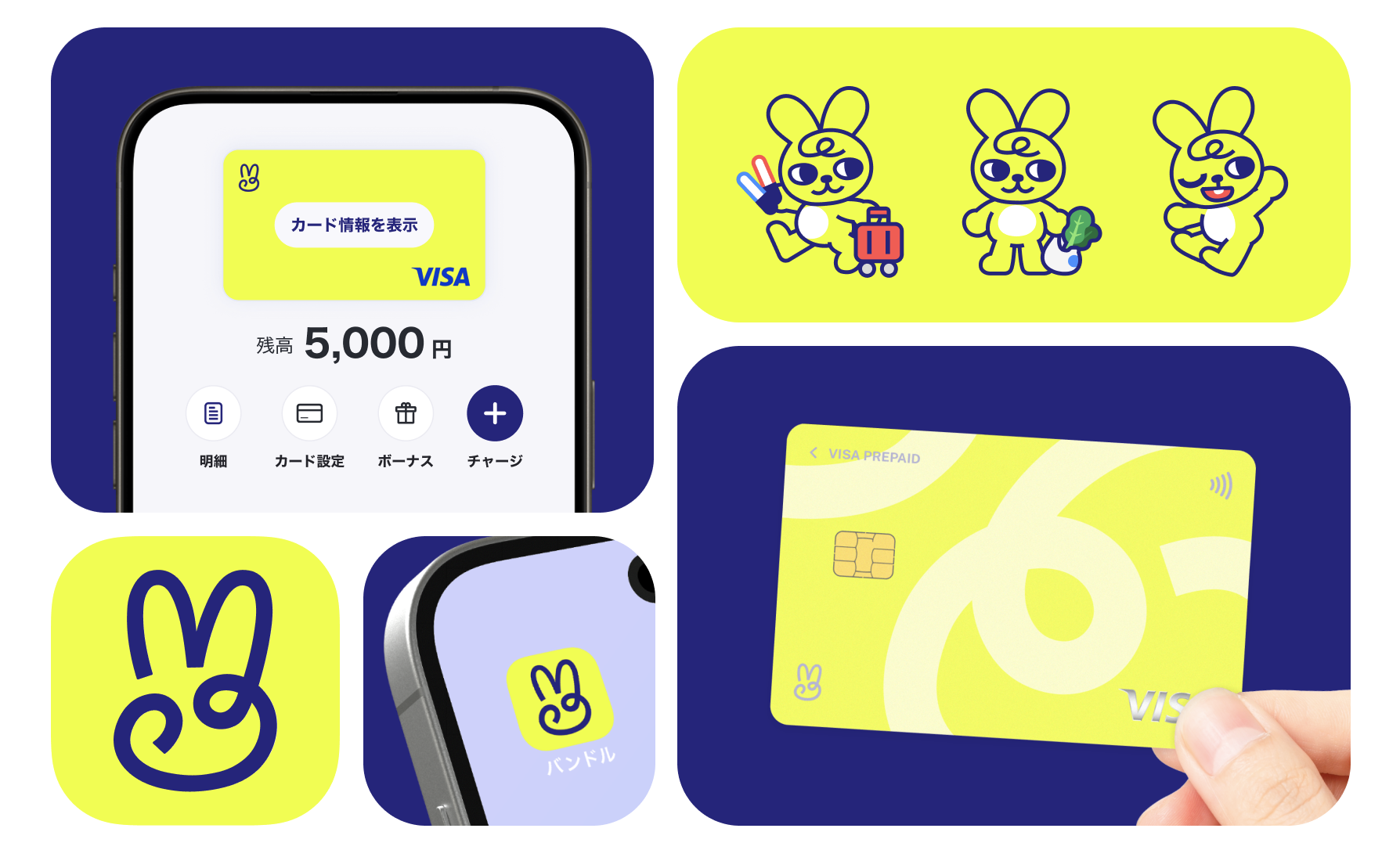
Features of the Bandle Card
The Bandle Card is a Visa prepaid card you can create for free from a smartphone app. You create an account just by entering your phone number, gender, date of birth and so on, and the card is issued right away with no screening.
Enter the card number and expiry date shown in the app and you can pay at online shops just like with a credit card. Besides the virtual card used in the app, you can also apply for a physical card for use in shops, and either card can be used to pay on Preaka.JP.
You can load from 1,000 to 100,000 yen (up to 30,000 yen per load), and its big strength is that you can load cash at convenience stores all over Japan.
What you need
- Bandle Card app (iOS / Android)
- A mobile phone number that can receive SMS
- Cash to load (can be loaded at convenience stores nationwide)
How to load
There are broadly two ways to load a Bandle Card. The detailed steps are in the official manuals (in Japanese).
Load at an ATM (no dealing with the register)
You put cash directly into an ATM installed in a convenience store.
Load at the register
You issue a payment number in the app and pay cash at the convenience store register.
- How to load a Bandle Card: convenience stores (FamilyMart, Ministop, Seicomart, Daily Yamazaki)
With either method the app guides you through the steps, so you should be able to load without looking at the manual.
Buying Premium with a Bandle Card
As an example, buying a 3,300 yen Premium coupon goes like this.
- Install the Bandle Card app and create an account (first time only)
- Load 4,000 yen onto the Bandle Card at a convenience store
- On Preaka.JP, choose credit card payment as the payment method, enter the Bandle Card details and place the order
Things to watch out for
Loading is in units of 1,000 yen as a rule, so depending on the price of the coupon you will have balance left over. In the example above 700 yen remains, but you can use it for your next purchase or at other online shops that accept Visa.
Also, a mobile phone number that can receive SMS is required to create an account. Your registered phone number and other details are not shared with Preaka.JP or the file host.
PayPay Balance Card
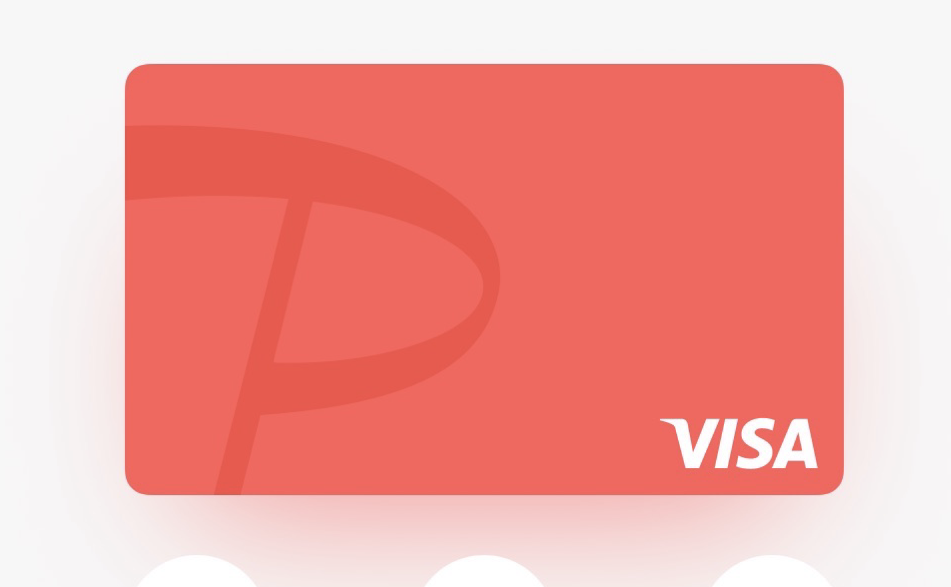
Features of the PayPay Balance Card
The PayPay Balance Card is a Visa prepaid card, launched in May 2025, that you issue inside the PayPay app. There is no physical card, only the card in the app, so you cannot use it in shops, but at online shops that accept Visa you can pay directly from your PayPay balance or PayPay points.
There is no screening or annual fee, and if your PayPay identity verification is complete, you can issue it from the app home screen in about 10 seconds. If you already use PayPay, this is the easiest way to get started.
What you need
- PayPay app (iOS / Android)
- A PayPay account with identity verification completed
- Cash to load (Seven Bank ATM or Lawson Bank ATM), or a bank account registered with PayPay
How to issue a PayPay Balance Card
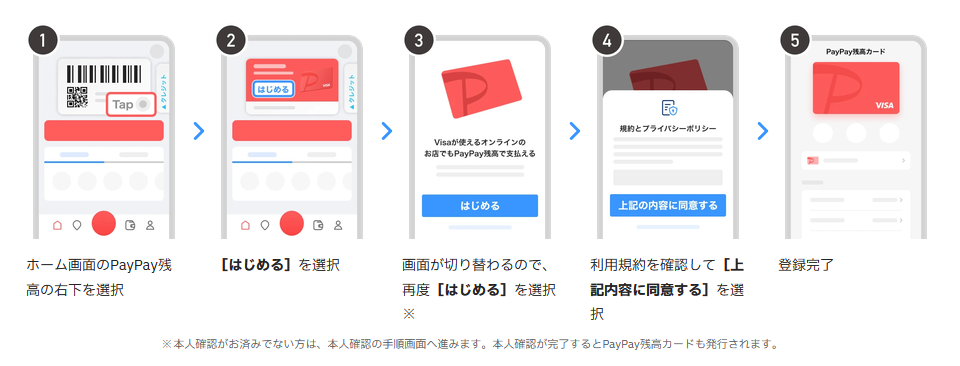
- On the PayPay app home screen, select the bottom right of your PayPay balance
- Select the Start button
- The screen changes. Select the Start button again
- Read the terms of use and select the button to agree
- Registration is complete
If identity verification is not complete, you are taken to the identity verification screen after step 3. Once identity verification is complete, the PayPay Balance Card is issued along with it.
How to load
There are two main ways to load your PayPay balance. The detailed steps are in PayPay’s official help (in Japanese).
Load cash at an ATM (in units of 1,000 yen)
Load from a bank account (to the yen)
How to check the card details
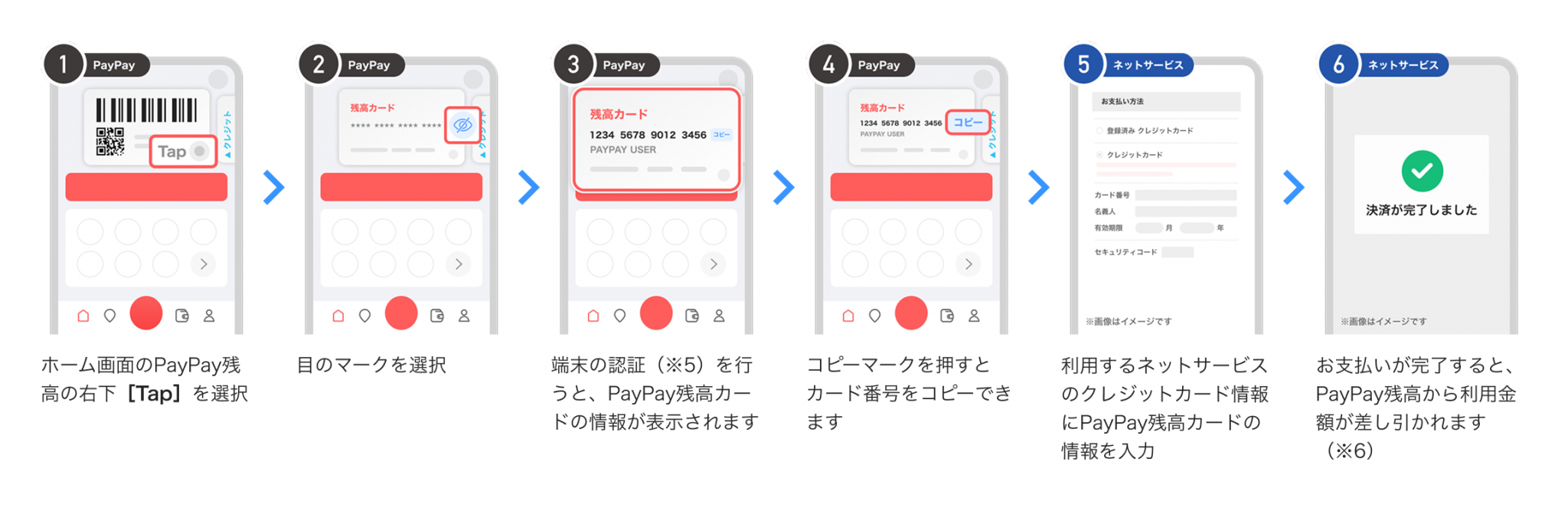
The card number and other details needed for payment can be checked in the PayPay app. It cannot be used if your PayPay balance is insufficient, so load it first.
- On the PayPay app home screen, select Tap at the bottom right of your PayPay balance
- Select the eye icon
- Authenticate on your device with fingerprint, face recognition or similar, and the PayPay Balance Card details are shown
- Press the copy icon to copy the card number
- On the Preaka.JP payment screen, enter the PayPay Balance Card details in the credit card fields
When payment is complete, the amount is deducted from your PayPay balance.
Note that if device authentication (fingerprint, face recognition and so on) is not set up, the PayPay Balance Card details cannot be shown. If they do not appear, check your phone’s authentication settings.
Things to watch out for when entering the card details
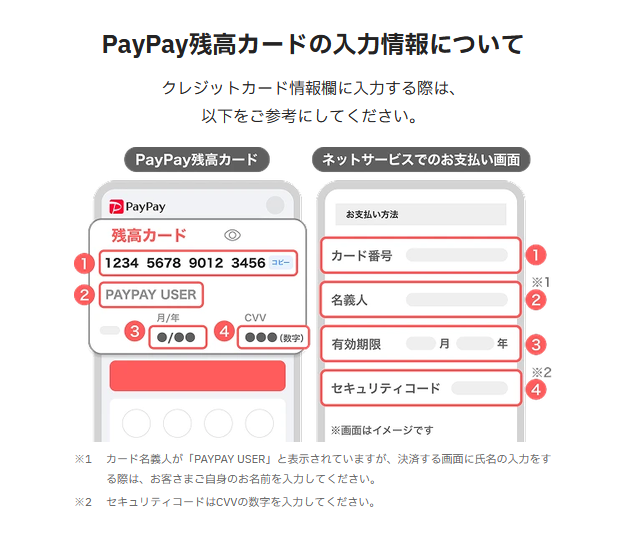
Enter the PayPay Balance Card details as follows.
- Card number: the 16-digit number shown in the app
- Cardholder name: the Preaka.JP payment screen has no cardholder name field, so you do not need to enter it
- Expiry date: the month/year shown in the app
- Security code: the 3-digit CVV shown in the app
Buying Premium with a PayPay Balance Card
As an example, buying a 10,700 yen Premium coupon goes like this.
- Complete identity verification in the PayPay app and issue a PayPay Balance Card (first time only)
- Load 11,000 yen at an ATM, or exactly 10,700 yen from a bank account, onto your PayPay balance
- Show the PayPay Balance Card details in the PayPay app
- On Preaka.JP, choose credit card payment as the payment method, enter the PayPay Balance Card details and place the order
Things to watch out for
Identity verification (eKYC) of your PayPay account is required to issue a PayPay Balance Card. If you have not done it yet, complete it first.
Also, loading from an ATM is in units of 1,000 yen, so depending on the price of the coupon you will have balance left over. If you have registered a bank account you can load to the yen, which is recommended if you want the exact amount. Leftover balance can be used at shops and online stores that accept PayPay.
V-Preca Gift Card
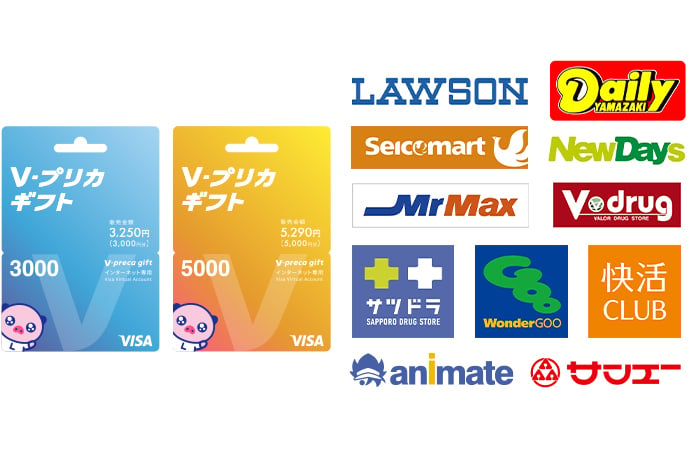
Features of the V-Preca Gift Card
The V-Preca Gift Card is an online-only Visa prepaid card that you can use right away with no account registration. There is no screening, and at online shops that accept Visa you can pay just as with a credit card.
Its key feature is that no account creation or phone number verification is needed. Once you buy it in a shop, you just enter the gift code, check the card details and start using it. Of the four cards, the V-Preca Gift Card and Vanilla Visa are the two that can be used even without a mobile phone that receives SMS.
What you need
- A shop that sells the V-Preca Gift Card (Lawson, Daily Yamazaki, Seicomart, NewDays, V Drug, Satudora, Animate and others)
Besides convenience stores, you can also buy it at the official V-Preca online shop.
How to check the card details
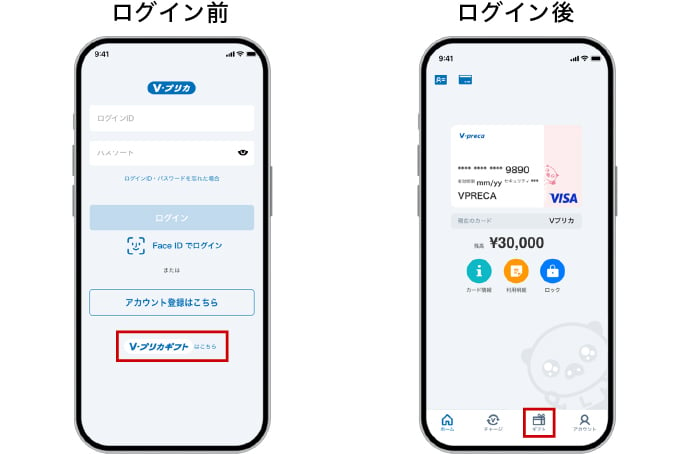
The card number, expiry date and security code are not printed directly on the card. After buying, you can check them by entering the card’s gift code.
- Check on the web: enter the gift code on the V-Preca Gift site
- Check in the app: open the V-Preca app (iOS / Android) and tap the V-Preca Gift link on the screen shown before logging in
You can check on the website without installing the app.
Buying Premium with a V-Preca Gift Card
- Buy a V-Preca Gift Card in a shop
- Enter the gift code on the V-Preca Gift site or in the V-Preca app and check the card details
- On Preaka.JP, choose credit card payment as the payment method, enter the V-Preca Gift Card details and place the order
Things to watch out for
The V-Preca Gift Card comes in only two amounts, 3,000 yen and 5,000 yen. A fee also applies at purchase: the 3,000 yen card sells for 3,250 yen and the 5,000 yen card for 5,290 yen.
The V-Preca Gift Card does not support 3D Secure (cardholder authentication). Note that it cannot be used as is on sites that require 3D Secure at payment.
If you want to buy a coupon over 5,000 yen, or you have balance left over, you need to create a V-Preca account and combine (load) the balances. Creating an account requires phone number verification, so if ease matters most, Vanilla Visa or the Bandle Card is the better fit.
Note that the digital V-Preca Gift sold at Lawson (300 to 10,000 yen) was discontinued in February 2026. What you can buy now is the card type on shop shelves (3,000 and 5,000 yen) and the version bought through Lawson’s Loppi terminal.
Which one is recommended? How to choose by purpose
All four prepaid cards can be used to pay on Preaka.JP, but each has different strengths. If you are unsure, use the following as a guide.
| Feature | Vanilla Visa | Bandle Card | PayPay Balance Card | V-Preca Gift |
|---|---|---|---|---|
| Amount unit | To the yen | 1,000 yen units | 1,000 yen units (to the yen from a bank account) | 3,000 yen / 5,000 yen |
| Limit usable on Preaka.JP | 10,000 yen per card (up to 5 cards with split payment) | 100,000 yen | Within your PayPay balance | 5,000 yen |
| Fee | Free (during the campaign; normally 5%) | Free (cash loading at convenience stores) | None | Yes |
| App | Not required | Required | Required | Not required |
| SMS / identity verification | Not required | SMS verification | Identity verification (eKYC) | Not required |
| Where to buy / load | FamilyMart, 7-Eleven and others | All convenience stores | Seven Bank ATM, Lawson Bank ATM, bank account | Lawson, Daily Yamazaki and others |
* Fees and available amounts are as of November 2026. Check each card’s official site for the latest information.
Just want to buy once, as easily as possible → Vanilla Visa
No app or phone number registration is needed: you just tell the amount at the convenience store register. You can specify the amount to the yen, so it matches the coupon price exactly with no balance left over. It is the one we recommend most for first-timers.
Plan to buy many times, or want an expensive plan → Bandle Card
You need to register in the app first, but once it is set up you can load at convenience stores nationwide at any time. It handles up to 100,000 yen, so a single card covers expensive coupons such as 365-day plans. Any leftover balance carries over to your next purchase.
Already use PayPay → PayPay Balance Card
If identity verification is complete, you can issue it from the app in about 10 seconds. From a bank account you can load to the yen, so you can use your existing PayPay balance with no waste.
Cannot receive SMS on a mobile phone → Vanilla Visa or V-Preca Gift
The two that can be used with no SMS or identity verification are Vanilla Visa and V-Preca Gift. Vanilla Visa is easier to use because you can specify the amount to the yen and are less likely to have balance left over, but if no shop near you sells Vanilla Visa, V-Preca Gift is also an option.
If in doubt, Vanilla Visa or the Bandle Card
Choose Vanilla Visa if you will use it once, or the Bandle Card if you will buy Premium many times from now on, and you will not go far wrong. If no shop near you sells Vanilla Visa, V-Preca Gift, available at Lawson and elsewhere, is also handy.
Extra: what to do with leftover balance
Apart from Vanilla Visa, where you can specify the amount to the yen, a few hundred yen of balance tends to be left over after paying with a prepaid card. Here are ways to use up the remainder without waste.
Buy an Amazon gift card (reload type)
Register the prepaid card on Amazon as a credit card and buy an Amazon gift card (reload type) for the same amount as the balance. Besides 5,000, 20,000 and 40,000 yen, the reload type lets you enter any amount to the yen from 100 yen up, so if your balance is 657 yen, for example, a 657 yen gift card uses it up exactly.
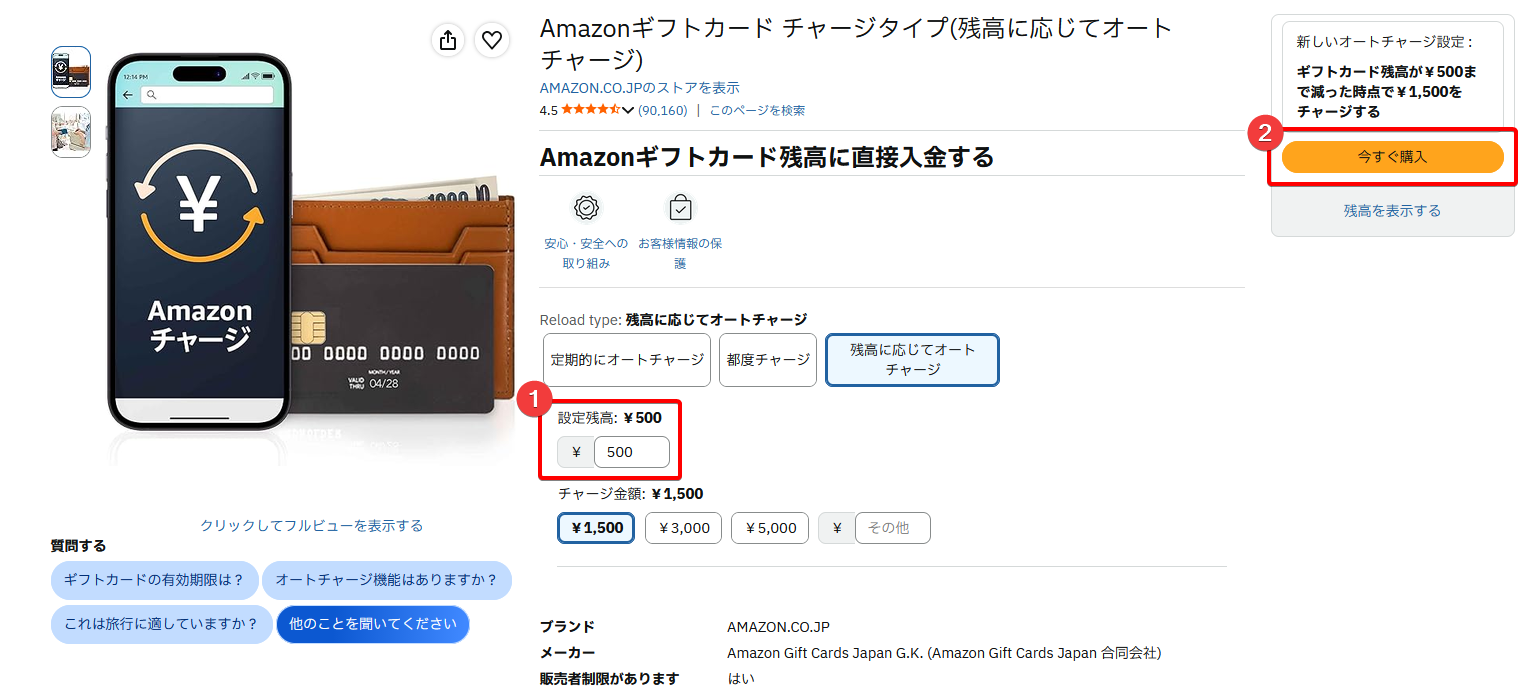
- STEP 1Enter the amount you like and tap Buy now
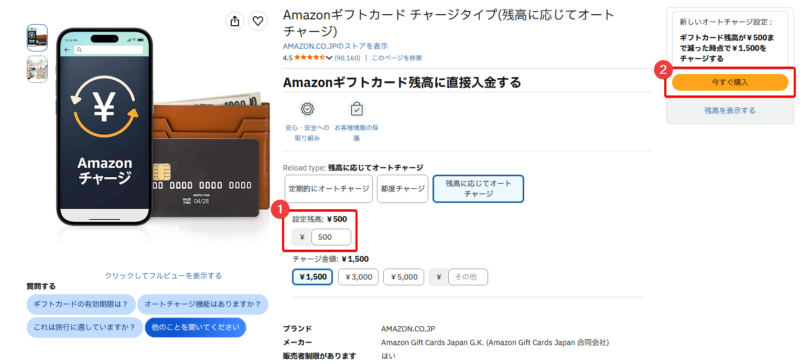
On the Amazon gift card (reload type) page, enter the same amount as your balance in the amount field and tap Buy now
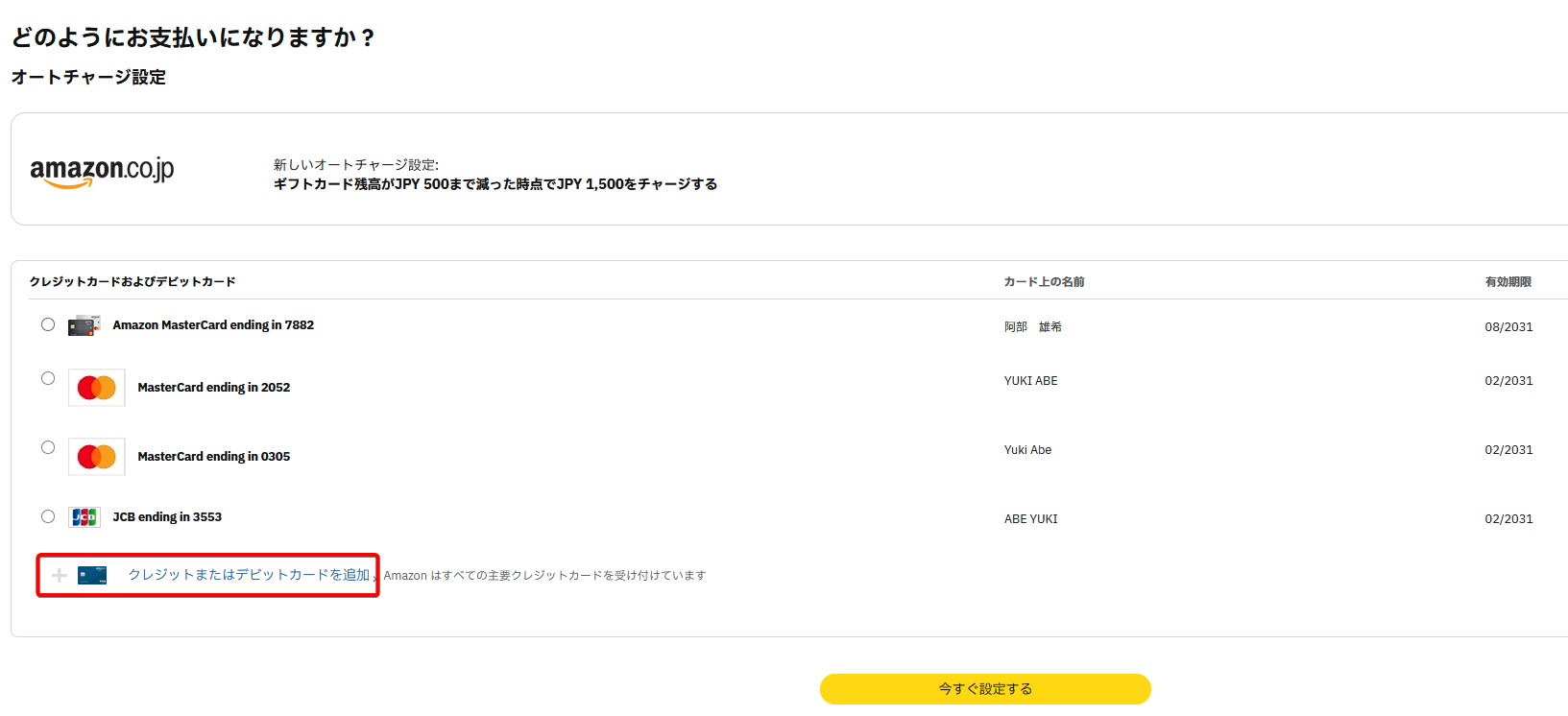
- STEP 2On the payment method screen, tap the option to add a credit or debit card
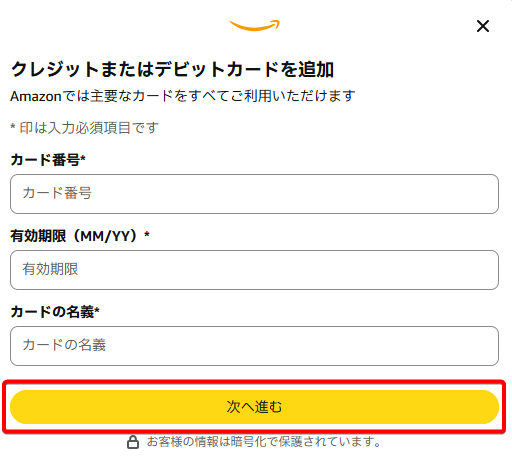
- STEP 3Enter the prepaid card details and tap Continue
- STEP 4Select the card you added, tap Use this payment method and confirm the order
If you already have another credit card registered on Amazon, that card may be selected at first. Be sure to add the prepaid card from the option to add a credit or debit card and select it instead.
Note that when you register the card, about 1 yen may be temporarily charged to check that it is valid. If the purchase fails, try again with that amount subtracted.
Once a prepaid card’s balance is used up, you can remove it from the payment methods screen on Amazon. If a finished card is left there, you might select it by mistake on your next purchase, so removing it is the safe thing to do.
Load it onto Mobile Suica
If you use Mobile Suica, you can use the prepaid card balance to top it up as a credit card. However, some prepaid cards are not supported. The Bandle Card officially supports topping up Mobile Suica.
Combine it with another payment method
Some online shops let you combine points with card payment. For example, if your prepaid card balance is 300 yen and you buy an 800 yen item, pay 500 yen with points and the remaining 300 yen with the prepaid card, and you use up the balance to the yen.
How the balance is handled for each card
- Bandle Card: the balance stays as it is, so you can use it for your next Premium purchase
- PayPay Balance Card: the balance remains as PayPay balance, so you can use it for everyday shopping where PayPay is accepted
- V-Preca Gift: if you create a V-Preca account, you can combine and use balances from the app or the web
Frequently asked questions
What if payment with a prepaid card fails?
Check that the card number, expiry date and security code are entered correctly and that the balance is at least the payment amount. If payment still fails, try another prepaid card or contact Preaka.JP support. You can also reach them through the chat at the bottom right of the Preaka.JP site.
What if I am asked for 3D Secure authentication?
V-Preca Gift does not support 3D Secure, so you cannot pay if authentication is required. In that case, use another card such as Vanilla Visa or the Bandle Card.
What if the payment failed but my balance went down?
With V-Preca and similar cards, if payment fails because of a wrong security code, the balance is sometimes held temporarily even though the payment was not completed.
In that case, contact Preaka.JP and they will arrange to have the balance released.
Are my card details or personal information ever passed to the file host?
No. A Premium coupon bought on Preaka.JP is used just by entering the code on the file host’s site, so you never need to enter card details on the file host’s side.
Also, a prepaid card can only be used up to the amount loaded in advance, so even if the card details were to leak, no more than that can be charged. Not having to enter your own bank account or credit card details is another benefit of using a prepaid card.
Main file hosts you can buy for on Preaka.JP
The prepaid cards introduced in this article can be used in the same way to buy a Premium coupon for any file host that Preaka.JP carries. How to use each file host and how to apply a coupon are explained in detail in the articles below.
| File host | How to use / how to buy Premium |
|---|---|
| Rapidgator | See how to use Rapidgator |
| Katfile | See how to use Katfile |
| TezFiles | See how to use TezFiles |
| Keep2Share | See how to use Keep2Share |
| ddownload | See how to use ddownload |
Summary
This article showed how to buy Premium for overseas file hosts with a prepaid card sold at convenience stores, even without a credit card.
Prepaid cards differ by type in the amounts you can buy and the registration needed. If you are unsure, Vanilla Visa for a one-off purchase, or the Bandle Card if you will buy Premium many times from now on, is a safe choice. If you already use PayPay, the PayPay Balance Card is also recommended.
At Preaka.JP, an authorized seller in Japan, you can buy Premium coupons in Japanese and in Japanese yen, so even if you are uneasy about paying on overseas sites, you can use it without worry.
How to use each file host is covered in the table above, and how to buy on Preaka.JP is explained in detail in the article below.
If anything is unclear, feel free to ask in the comments. I will answer as best I can.


コメント