

“My Katfile download suddenly stopped working…”
“My password is correct, but I can’t log in.”
“It says Wrong IP and I can’t continue.”
“It says my account has been banned.”
Katfile is a popular overseas file host, but its site behaviour and domain sometimes change without notice. So it is not unusual for something that worked yesterday to suddenly stop working.
This article explains the causes and fixes for when you can’t download, can’t log in, or your account has been banned on Katfile.
It is organised so that you can tell whether the problem is on your side or a change on Katfile’s side.
- First, narrow down the cause
- What to do when a file won’t download
- What if I can’t log in?
- What if my account has been banned?
- How to contact Katfile support
- If it suddenly stops working, it may be a change on Katfile’s side
- Frequently asked questions (FAQ)
- Summary: with Katfile problems, narrowing down the cause is what matters
First, narrow down the cause
Start by checking the table below for a symptom that matches yours.
| Symptom | Likely cause | What to do |
|---|---|---|
| The download button is not shown / you cannot continue | The file is for Premium members only, or a free-member limit applies | Go Premium, or wait until the waiting time (120 minutes) is over |
| “Wrong IP” is shown | Your IP address changed between logging in and downloading | Keep your VPN and connection fixed and start again from the beginning |
| You have Premium but cannot download | You have used up the total traffic of your plan | Check what is left in My Account and buy extra traffic |
| “Incorrect Login or Password” is shown | Your password may have been reset automatically | Do not keep trying to log in; reset your password |
| “Your account was banned by administrator.” is shown | Your account was banned because of how it was used | Contact Katfile support |
| “This account has been suspended due violation.” is shown | The mass suspension of Lifetime plans (September 2026) | If it has not been lifted, contact Katfile support |
| File not found | The file has been deleted | Nothing can be done (wait for a re-upload) |
| None of the above | It may be a change or outage on Katfile’s side | Wait a while and try again |
Each of these is explained in detail below, in order.
What to do when a file won’t download
You are hitting a free-member limit
If you cannot download as a free member, one of the following almost always applies.
- The file is for Premium members only
- 120 minutes have not passed since your last download (a waiting time is shown)
- The file size exceeds the limit for free members
- The file has already been deleted
For free downloads, once you start one download you have to wait 120 minutes before the next one. While waiting, the message “Delay between free downloads must be not less than 120 minutes.” and a countdown are shown. Changing your VPN location does not change the waiting time.
Apart from deleted files, going Premium greatly relaxes these limits. How to buy Premium is explained in How to Use Katfile: Sign-up, Premium Purchase and Payment Methods.
“Wrong IP” is shown

This error is shown when your IP address changes between logging in and the end of the download. Your IP address changes when you switch VPN, connection or device.
The following actions cause it.
- You turned a VPN on or off while using the site, or switched country or server
- On a smartphone, the connection switched between Wi-Fi and mobile data partway through
- You logged in on a computer and downloaded on a device using a different connection
If you use a VPN, connect before you log in and keep the same location until the download is finished.
If that does not help, the IP address may be restricted on Katfile’s side. Change your VPN location or turn the VPN off, then log in again and try.
Downloads are slow even with Premium
Speed may drop depending on the time of day or the distance to the server. Changing the time of day, or switching location if you use a VPN, sometimes helps.
You have Premium but cannot download (traffic used up)
Even Premium members cannot download once they have used up the total traffic set for their plan. On the 30-day plan, that is 6 TB in total.
Previously the cap was 200 GB per day and it was restored the next day even if you used it up. Since November 2026 it is counted as a total over the subscription period, so waiting does not restore it.
You can check how much is left in My Account. If you run short, you can add more from Buy extra traffic in My Account.
What if I can’t log in?
Sometimes the following message is shown even though you entered the correct username and password.
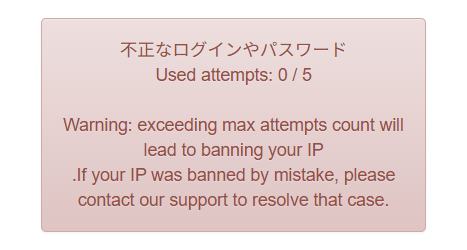
In this case, your password may have been reset automatically by Katfile.
Since around September 2026, Katfile has been automatically resetting the passwords of accounts that show unusual activity. The email notifying you of the reset sometimes does not arrive, so more and more people keep trying to log in with their old password without realising it has changed.
If you fail to log in 5 times, the IP address you are using is blocked. Do not keep trying the same password; reset your password with the steps below.
How to reset your password
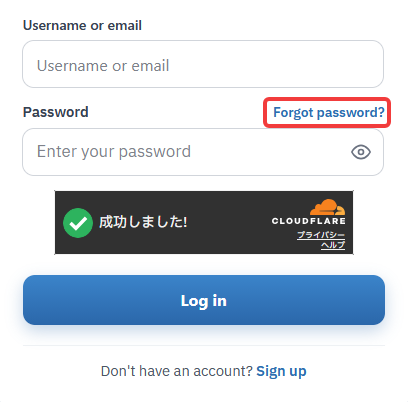
On the Katfile login screen, click Forgot password?
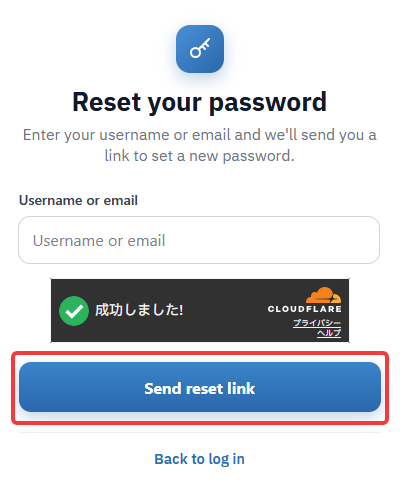
Enter your username or registered email address and click Send reset link. Your username (login name) is written in the email you received when you created the account. If you are not sure, enter your registered email address instead.
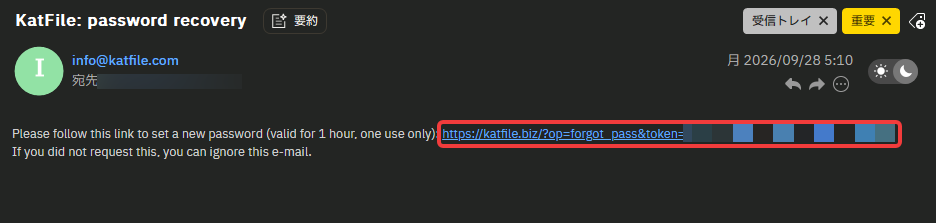
Click the link in the email you receive. The link is valid for 1 hour and can be used only once.
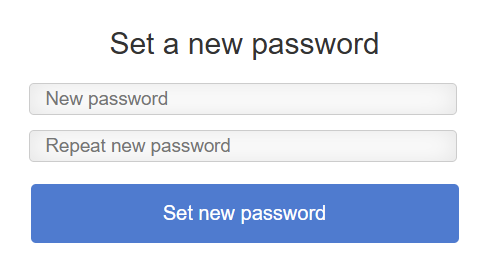
When the page opens, set a new password. You will be able to log in again with the new password.
However, an account whose password was reset automatically has probably been flagged by Katfile. Continuing to use it the same way as before may lead to a ban, so check the precautions in the next section before using it.
What if my account has been banned?
When an account is banned, you cannot do anything, including logging in. There are two messages, each with a different cause.
| Message shown | Cause | What to do |
|---|---|---|
| Your account was banned by administrator. | The account was banned individually because of how it was used | Contact support |
| This account has been suspended due violation. | In September 2026, Lifetime plan accounts were suspended all at once | Lifted after inspection. If it is still shown, contact support |
In either case, resetting your password does not solve it.
If “Your account was banned by administrator.” is shown
Your account has been banned individually. Contact Katfile support. Whether it is lifted is up to Katfile.
This ban often happens after the following kinds of use.
Kinds of use that tend to lead to a ban
For banned accounts, there are many reports of the following circumstances beforehand.
- A “Wrong IP” error was shown while using the site
- Three or more files were being downloaded at the same time
- The account was logged in from several devices at the same time
The typical sequence is that the password was then reset automatically, and when the user reset it and logged in, the account was banned.
Three precautions to avoid a ban
- Use the same IP address from login until the download is finished (do not switch VPN or connection partway through)
- Download no more than 2 files at the same time
- Do not log in from several devices at the same time (log out when you are done)
Katfile’s description of Premium says there is no limit on the number of simultaneous downloads. However, there has been a run of bans after downloading three or more files at once, so keeping it to two is the safe choice.
If you use a download manager such as JDownloader2, set the number of simultaneous downloads to 2 or fewer. For the feature that downloads one file in segments, we also recommend setting the number of segments to 1 to be safe. It is also best to avoid using a browser and the software at the same time.
If “This account has been suspended due violation.” is shown

This is the message that was shown when Lifetime plan accounts were suspended all at once in September 2026. It is separate from the “banned” case above, and it was shown even on accounts that had been used without any problem.
Because many cases of abuse of the Lifetime plan were found, Katfile temporarily suspended all Lifetime accounts and inspected them one by one. The inspection ended on 8 September, and the suspension has been lifted for accounts where no violation was found.
If this message is still shown, contact Katfile support or the seller you bought from.
How to contact Katfile support
Contact them from Katfile’s Contact page.
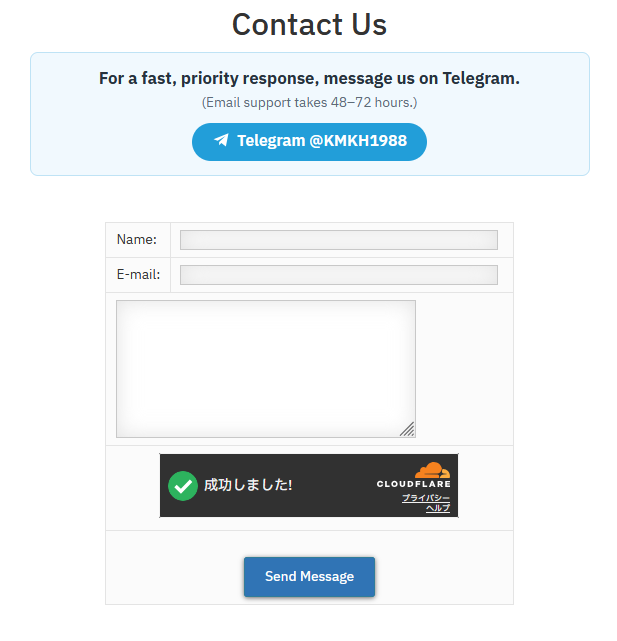
- Enter your name and email (we recommend the email address registered with Katfile)
- Describe the situation in the message field, in English
- Click the send button
Including your username, the error message shown and the date and time it happened makes the exchange go more smoothly.
A reply by email is said to take 48 to 72 hours. If you are in a hurry, you can also contact them on Telegram (@KMKH1988), which is listed on the same page.
If it suddenly stops working, it may be a change on Katfile’s side
If none of the above applies but it suddenly stopped working, the cause is often a change or a temporary outage on Katfile’s side. Check the following points.
- Reopen the site from the current official site, not from a bookmark or an old link
- Clear your browser cache, or try another browser
- If you use JDownloader2, update it to the latest version
- Wait a while and try again
Main changes and incidents so far
| When | What happened |
|---|---|
| September 2026 | Lifetime plan accounts were suspended all at once and reinstated after inspection |
| From around September 2026 | Automatic password resets began for accounts showing unusual activity |
| October 2026 | Reports of accounts being banned after a password reset increased |
| November 2026 | The way download volume is counted changed from 200 GB per day to a total over the subscription period (6 TB on the 30-day plan) |
New changes will be added to this table as they happen.
Frequently asked questions (FAQ)
Do I need to register to download?
No. You can download for free without registering or logging in. However, free downloads are limited to 100 KB/s.
Also, once you start a download, there is a 120-minute wait before the next one. During that time, the following message and a countdown are shown.

With Premium, the waiting time disappears and the speed limit on free downloads is removed.
Is it better not to use a VPN?
Using one is fine. What triggers a ban is not VPN use itself, but your IP address changing while you are using the site. Connect before you log in and keep the same location until the download is finished.
For more about VPNs, see Why Using Overseas File Hosts Without a VPN Is Risky.
What if I want to use it on both a computer and a smartphone?
Log out on the device you were using, then log in on the next device. If a device is left logged in, you are logged in on both at the same time. Also, switching devices can change your IP address, so handle each file on the same device from login until the download is finished.
Will I avoid a ban if I keep simultaneous downloads to 2?
We cannot say for certain that you will not be banned. Katfile has not published its criteria, and the figure of 2 is a rule of thumb based on reported cases. Also keep to the same IP address and avoid simultaneous logins.
What if the password reset email does not arrive?
First, check your spam folder. If it is not there, send the link again from the password reset screen. If it still does not arrive, contact Katfile support or the seller you bought from.
What if “Used attempts” reaches 5?
The IP address you are using is blocked. The block is lifted automatically after 24 hours. The error message says to contact support if you were blocked by mistake, so if you are in a hurry, contact Katfile support.
Summary: with Katfile problems, narrowing down the cause is what matters
This article explained the causes and fixes for when you can’t download, can’t log in, or your account has been banned on Katfile.
- If you can’t log in, do not keep trying; reset your password
- If “Your account was banned by administrator.” is shown, contact Katfile support
- To avoid a ban, use the same IP address, keep simultaneous downloads to 2, and do not log in from several places at once
Katfile is a service whose behaviour changes often, so even if it suddenly stops working, stay calm and start by narrowing down the cause.
The basics of using Katfile and how to buy Premium are explained in How to Use Katfile: Sign-up, Premium Purchase and Payment Methods.
If anything is unclear, feel free to ask in the comments. I will answer as best I can.







コメント