

[Updated for 2026] “Rapidgator” is one of the longest-running file hosting services. It has a stable track record and is used by people all over the world.
This guide walks you through creating an account, buying a Premium plan, and downloading files, step by step, so that first-time users can follow along.
It also answers common questions such as “Can Rapidgator really be trusted?” and “Do I actually need Premium?”, and covers payment methods, frequently asked questions, and points to watch out for.
Official URL: rapidgator.net
- What If I Can’t Download, It’s Slow, or I Get an Error?
- What Is the Best Way to Buy? Can I Use PayPal, V-Preca, or PayPay?
- Is There a Daily Download Limit (Bandwidth)?
- Does Used-Up Bandwidth Come Back?
- How Fast Are Premium Downloads?
- Are Free PLGs Safe?
- How Do I Contact Official Support?
- Is It True That Files Get Uploaded Without My Knowledge?
- Is Rapidgator Illegal? Is It Safe to Use?
New to File Hosting Services?
File hosting services have their own rules and risks, and there are several points to be careful about.
The basics, the risks, and the precautions are explained in detail in the article below.

What Is Rapidgator?
“Rapidgator” is an online storage service where you upload files and share them by URL. The official site is “rapidgator.net”.
Three Things to Keep in Mind to Use It Safely
“Rapidgator” itself is a legitimate online storage service, and using the official site is not dangerous in itself. To use it safely, keep the following three points in mind.
- Stay away from fake sites: There are other sites with URLs that look very similar to the official one, such as “rapidgators.net”. Before you log in or pay, check that the URL is “rapidgator.net”. See “Watch Out for rapidgators.net” for details.
- Do not use free PLGs: Some premium link generators (PLGs) can infect your device with malware or redirect you to scam sites.
- Do not handle files that infringe copyright: The service itself is legal, but downloading files that were uploaded illegally can be punished by law.
For more on legality and safety, see “Is Rapidgator Illegal? Is It Safe to Use?” in the FAQ.
You can download files without creating an account, but free downloads are limited in speed and number. The next section explains what changes when you become a Premium member.
Five Benefits of Becoming a Premium Member
With a “Rapidgator” Premium membership, the strict limits placed on free users are greatly relaxed, and downloading becomes much more comfortable.
First, check the comparison table below to see how Premium differs from a free account.
| Feature | Free | Premium |
|---|---|---|
| Download speed | Slow | Fast |
| Wait before download starts | Yes | None |
| Simultaneous downloads | No | Yes |
| Downloads per day | Up to 3 files | Unlimited |
| Premium-only files | No | Yes |
| Ads | Yes | None |
| Resume | No | Yes |
As you can see, there is a big difference in usability.
The five benefits are explained in more detail below.
No Waiting and Downloads Measured at 50MB/s
The long countdown before a download starts and the severe speed limits that come with a free account are gone. In our own tests we recorded 50MB/s, so even large files finish quickly.

The image shows the speed when downloading several files in parallel with JDownloader2.
Simultaneous Downloads and No Daily Limit
You are freed from the free-account limits of “up to 3 files per day” and “wait for one download to finish before starting the next”.
Because you can download multiple files at once with no limit on the number, you can queue them before going to bed and find them all finished in the morning.
Premium-Only Files Become Available
Many files uploaded to “Rapidgator” are set as “Premium members only”. Once you are a member, you can download all of these files freely.
No Ads
The ads that cover the screen and the aggressive pop-ups that open when you click, both common on free accounts, no longer appear. The risk of being sent to another site by a mis-click also disappears, so you can work safely and comfortably.
Resume and Other Helpful Features Are Unlocked
Premium members can use the following download features that free users do not have.
- Resume: If the connection drops, you can continue from where it stopped. This prevents a long download from failing at the very end and going to waste.
- Direct download: Clicking a link starts the download immediately, without going through an intermediate page.
Premium Plan Pricing and How to Choose
Unlike other file hosts, “Rapidgator” Premium plans let you freely combine two factors: “days × bandwidth (data volume)”.
For example, 30 days with 4TB of bandwidth costs $39.99, while 60 days with 2TB costs $29.99, so you can adjust the price to match how you use it.
| Days | 1TB | 2TB | 4TB | 6TB | 12TB | 24TB | 48TB |
|---|---|---|---|---|---|---|---|
| 30 days | $14.99 | $29.99 | $39.99 | ||||
| 60 days | $29.99 | $39.99 | $49.99 | ||||
| 90 days | $39.99 | $49.99 | $99.99 | ||||
| 180 days | $49.99 | $99.99 | $199.99 | ||||
| 365 days | $99.99 | $199.99 | $399.99 |
When Premium Ends and When to Buy Again
A “Rapidgator” Premium plan is a set of “valid days” and “traffic (bandwidth)”.
The point to note is that Premium ends as soon as either one reaches zero.
- Example: the “30 days, 1TB” plan
Premium ends when 30 days have passed or when you have downloaded 1TB of data.
If you still have days left but cannot download as a Premium member, check whether your available bandwidth has reached zero.

The image above shows an account that has used up its available bandwidth.
In this state you cannot download as a Premium member, even if days remain.
To keep downloading at high speed, you need to buy a Premium plan again.
How to Buy a Premium Account
Create an Account
Create an account from “Rapidgator“.

Click “Registration” in the top menu.
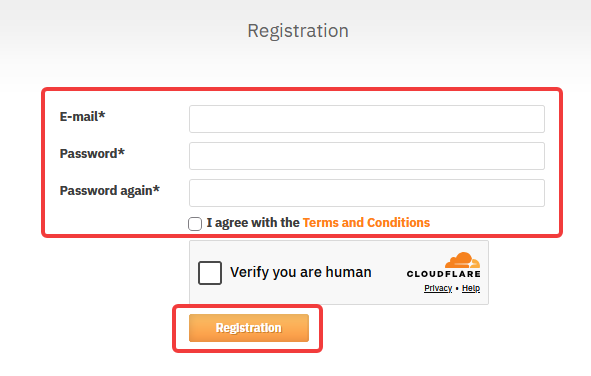
Enter your “email address” and “password” (twice), tick “I agree with the Terms and Conditions” and “Verify you are human“, then click “Registration“.
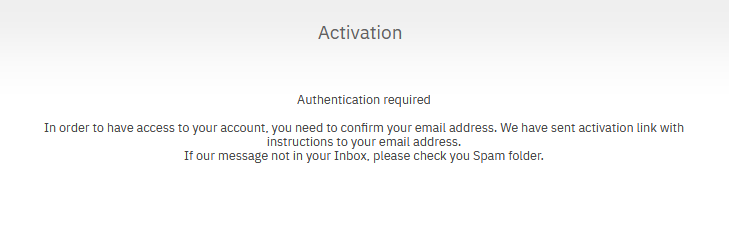
An activation email is sent to the address you registered.
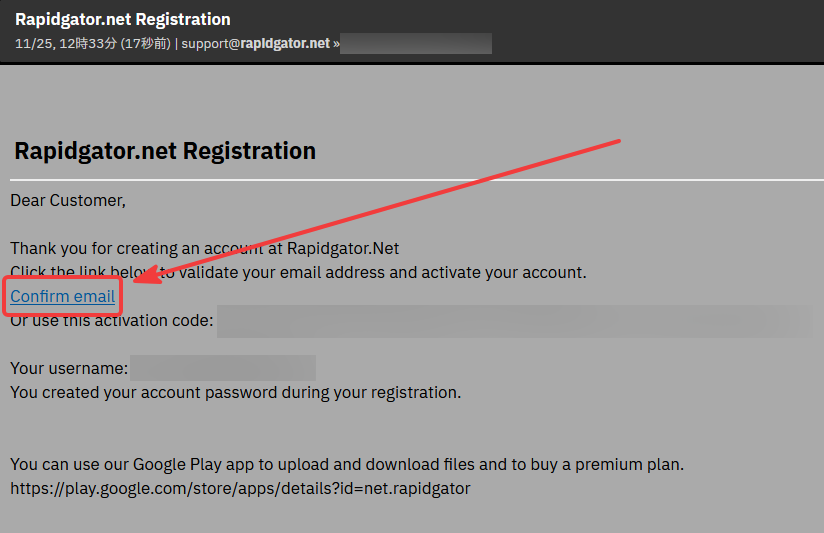
Check that you have received an email with the subject “Rapidgator.net Registration“.
To confirm your email address, click “Confirm email” in the message.
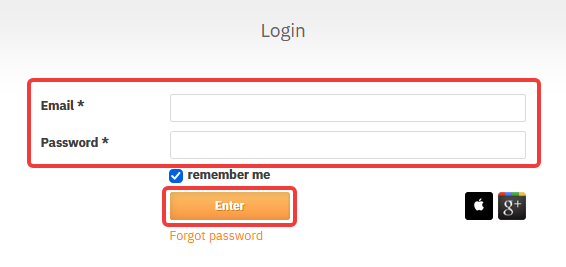
You are taken to the login page. Enter your email address and password, then click “Enter“.
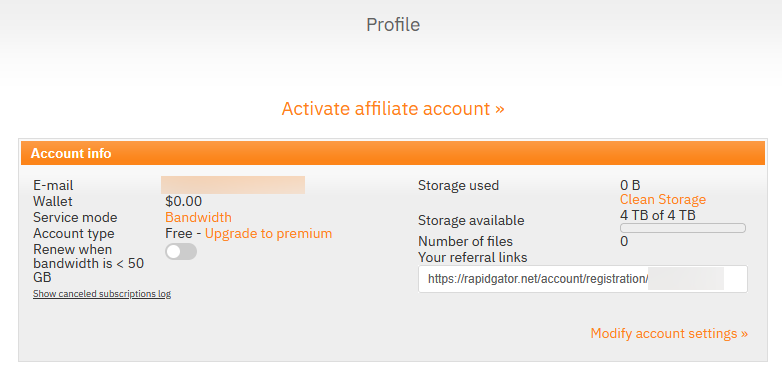
If you can log in, you are all set.
Your “Rapidgator” account is now created.
Buy Premium
Go to the purchase page from “Rapidgator“.
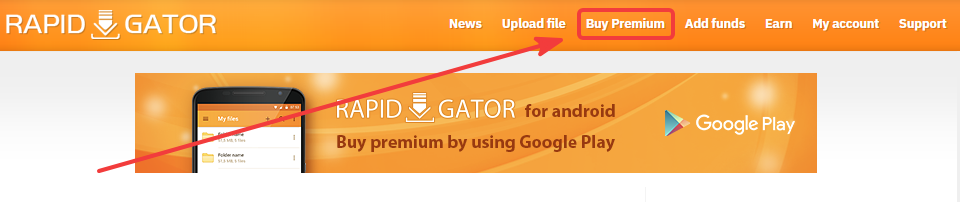
When the page opens, click “Buy Premium” in the top menu.
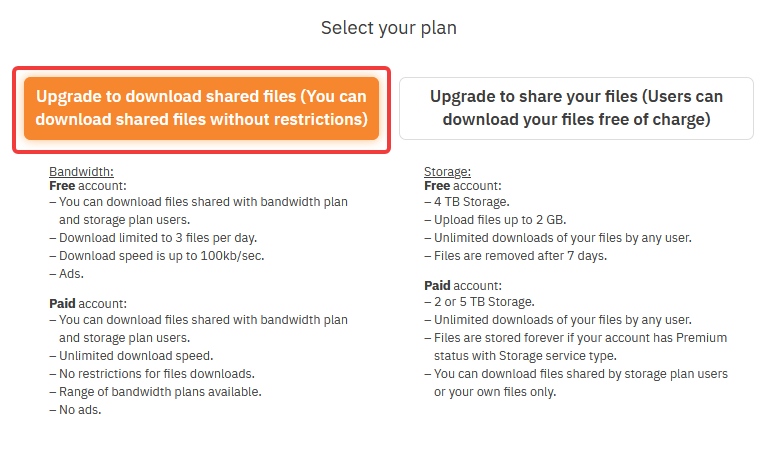
When the plan type selection screen appears, click the option for upgrading to download shared files (the one marked in the image).
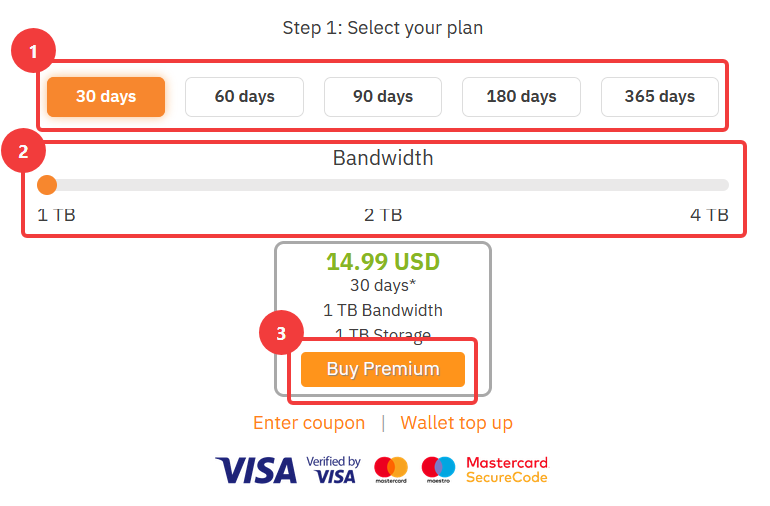
When the list of plans appears, choose the number of days and the bandwidth you want and click it.
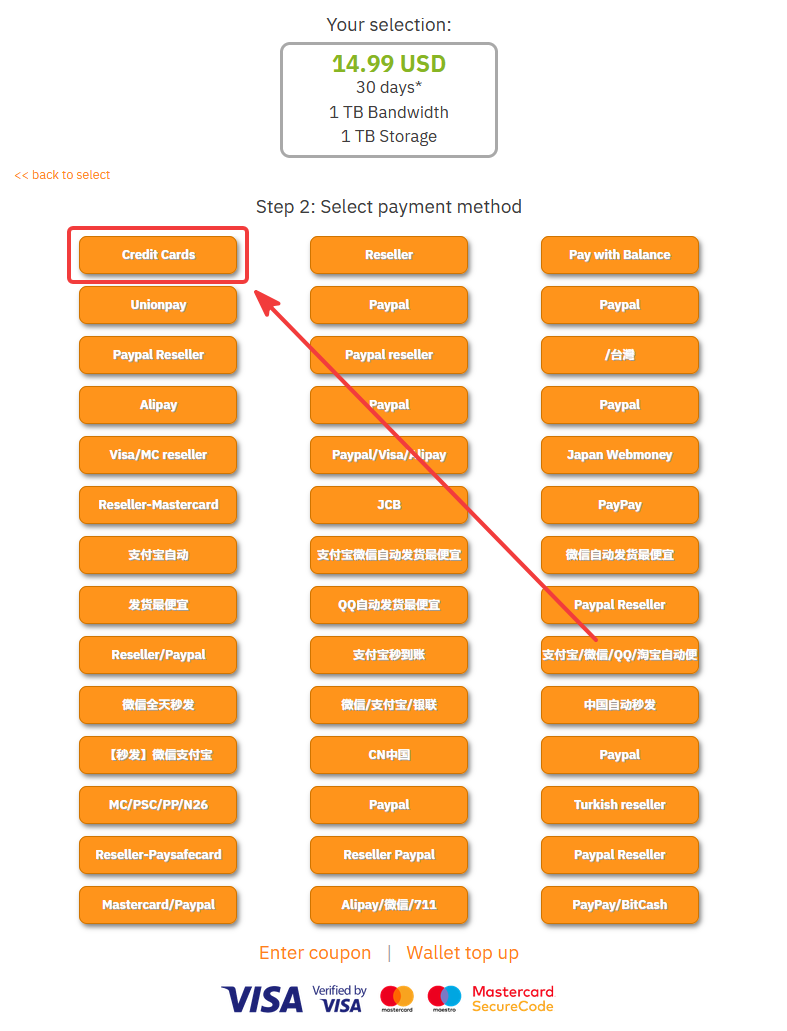
To pay by credit card, click “Credit Cards“.
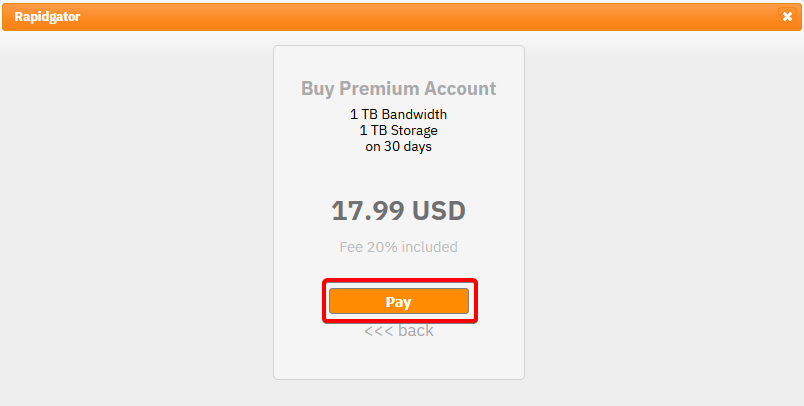
The plan details are shown. Click “Pay“.
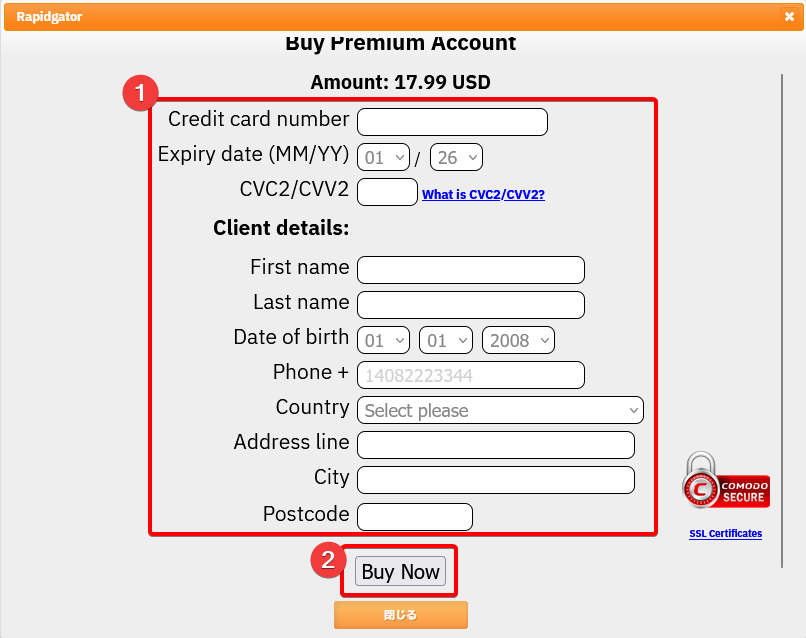
Enter your credit card details and personal information, then click “Buy Now“.

When “Success payment” is displayed, the payment is complete.
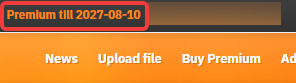
Refresh the page and your Premium period is displayed.
Your “Rapidgator” account is now Premium.
How to Buy a Premium Coupon from Preaka.JP
If you would rather not enter personal information on an overseas site, or you want to pay in Japanese and in Japanese yen, “Preaka.JP” is a good option. It accepts credit cards as well as Google Pay and various other payment methods. Note that Preaka.JP restricts purchases made from outside Japan.
Go to the purchase page from “Rapidgator“.
When the page opens, click “Buy Premium” in the top menu.
When the plan type selection screen appears, click the option for upgrading to download shared files (the one marked in the image).
When the list of plans appears, choose any combination of days and bandwidth (it does not matter which) and click “Buy Premium“.
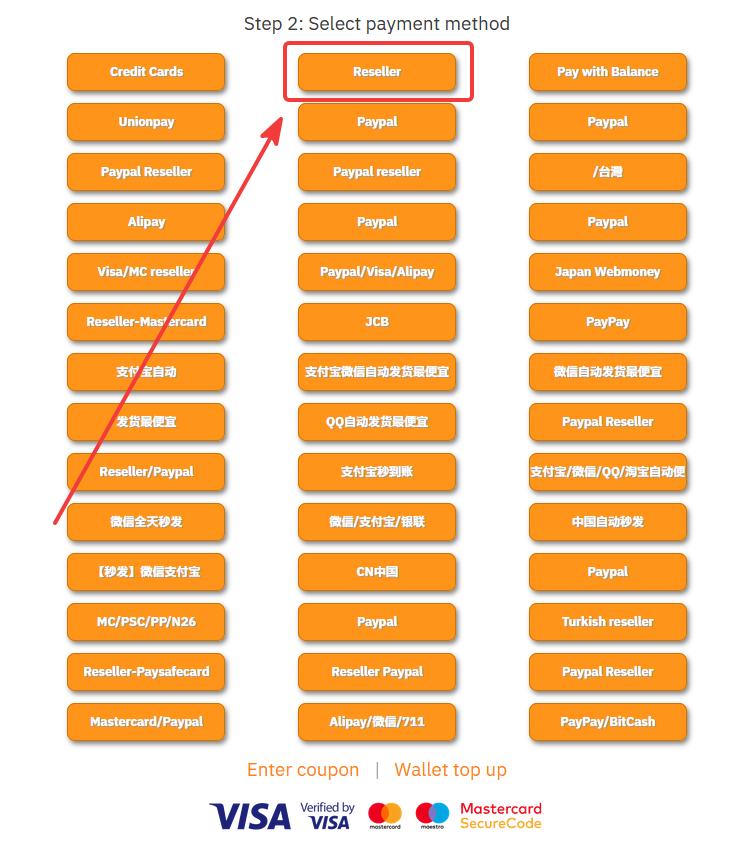
Click “Reseller“.
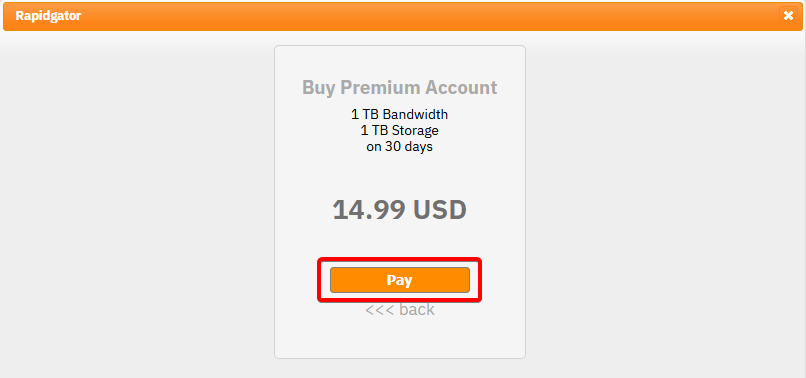
Click “Pay“.
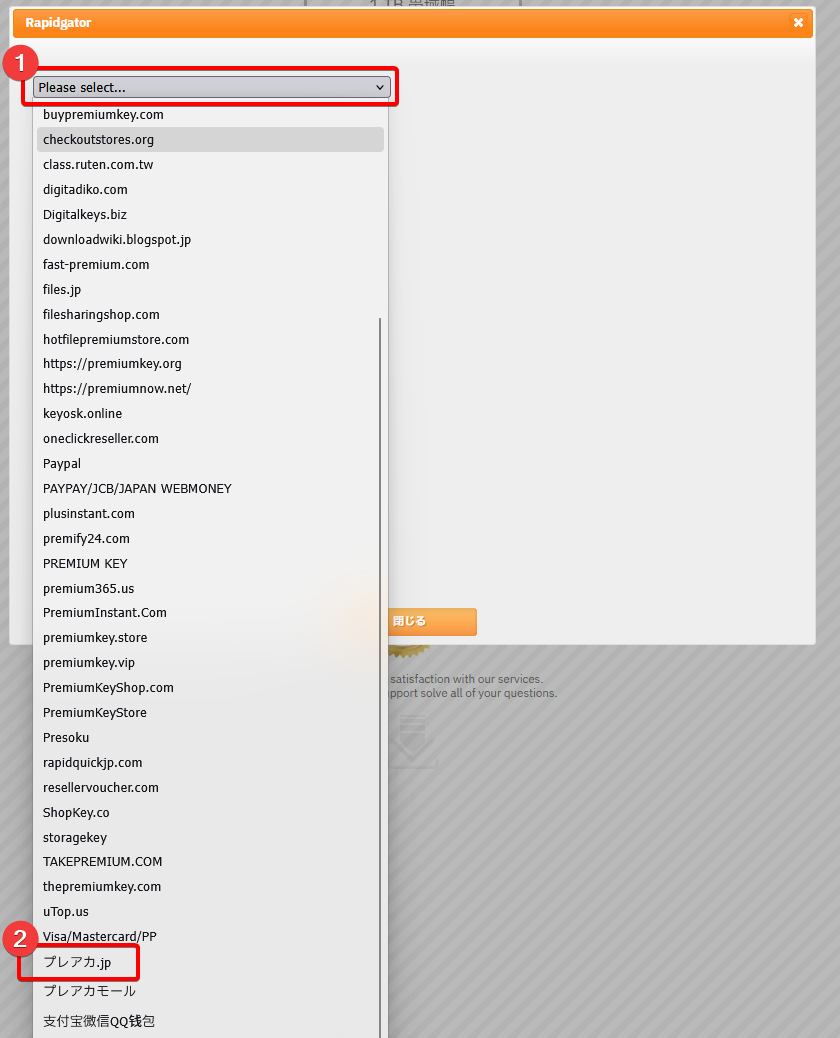
Click “Please select…“, then click “プレアカ.jp” (Preaka.JP).
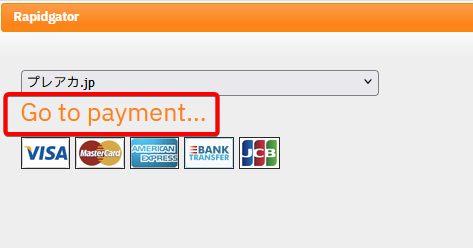
Click “Go to payment…“.
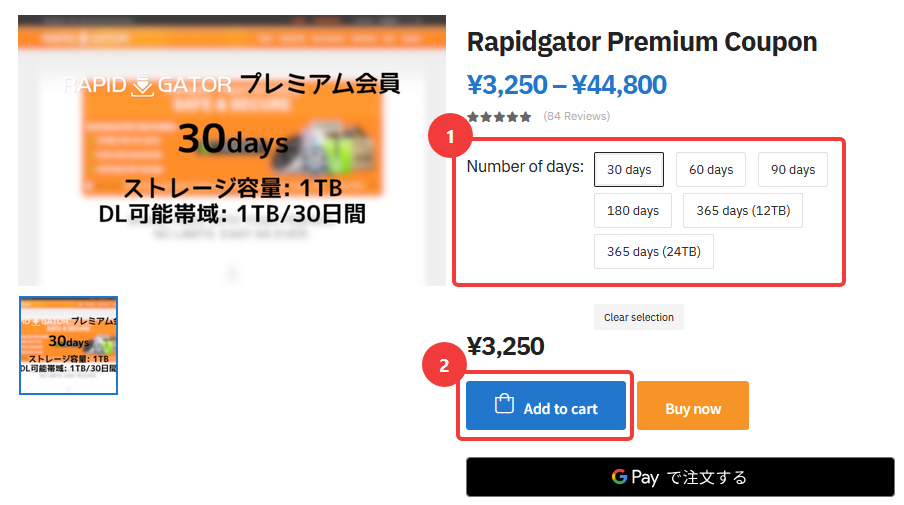
Select the number of days you want and click “Add to cart“.
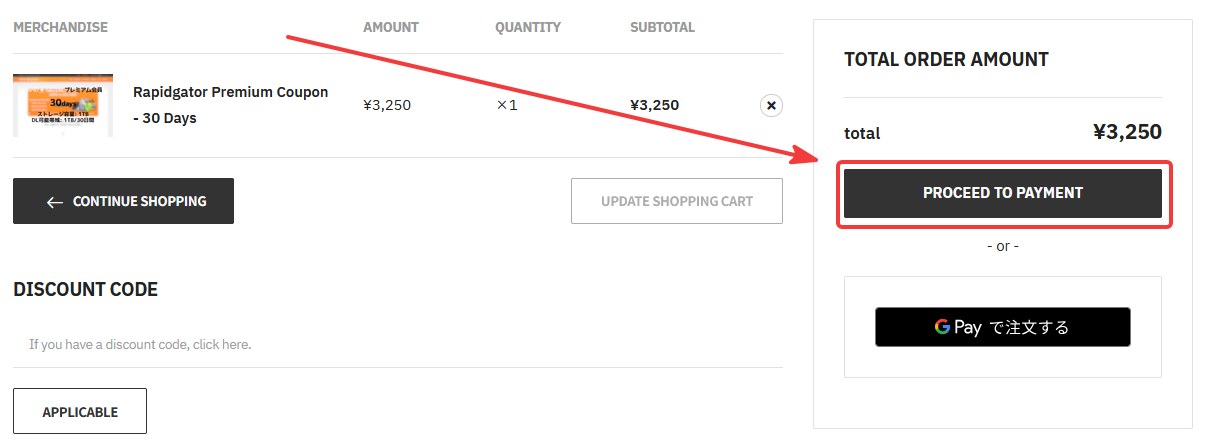
Go to the cart and click “Proceed to payment“.
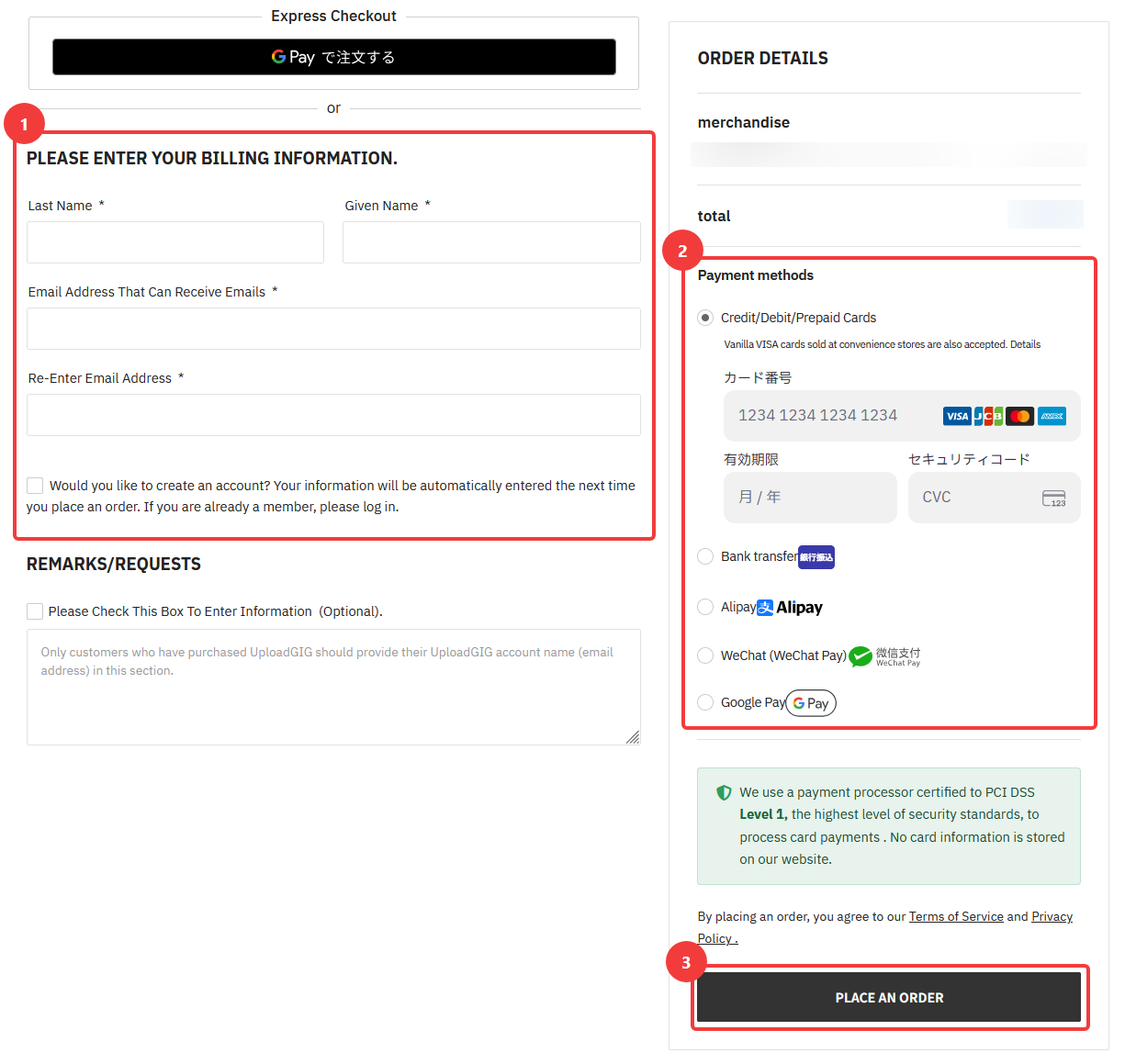
Enter your name and email address under PLEASE ENTER YOUR BILLING INFORMATION, choose a payment method, and click Place an order.
For payment, you can choose from credit card, prepaid card, bank transfer, and other methods.

When the payment is complete, the “Rapidgator” Premium coupon is sent to the email address you registered.
Delivery takes 5 minutes to 24 hours, but in our experience it almost always arrives within 30 minutes.
With card payment it often arrives within a few minutes. With bank transfer, it is sent after your payment has been confirmed.
How to Use a Premium Coupon
Go to the “Rapidgator coupon activation page“.
When the page opens, click “Buy Premium” in the top menu.
When the plan type selection screen appears, click the option for upgrading to download shared files (the one marked in the image).
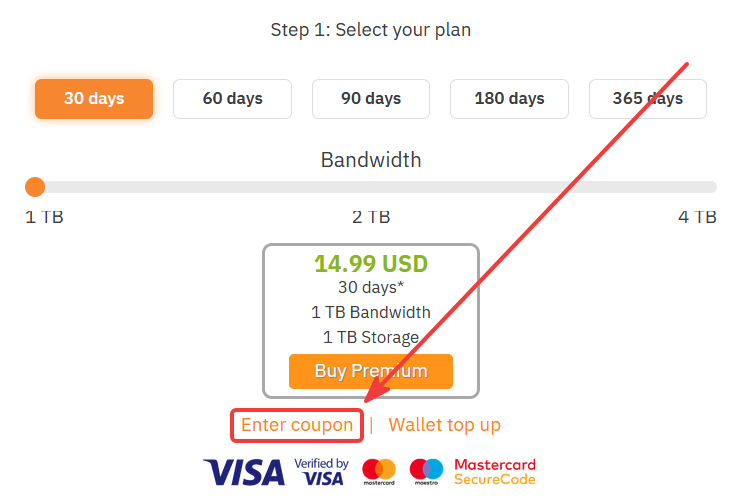
Click “Enter coupon” at the bottom of the plan selection screen.
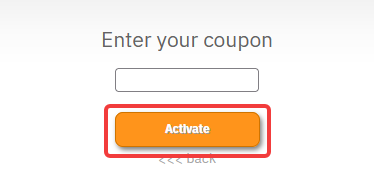
Enter your Premium coupon in the “Enter your coupon” field and click “Activate“.
Your “Rapidgator” account is now Premium.
If the Coupon Entry Screen Does Not Appear
On an account where Premium is already active, the following message is shown and you cannot enter a coupon.
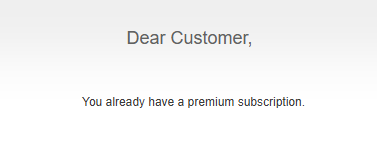
You can enter a coupon in either of the following cases.
- When your Premium period has expired
- When your remaining bandwidth falls below 50GB
Even if days remain, you can enter a coupon once your remaining bandwidth is below 50GB. In that case, however, the bandwidth you had left disappears and is replaced by the amount from the new coupon. If you bought a coupon in advance, enter it after you have used up your current Premium.
How to Download Files
File URLs that can be downloaded from “Rapidgator” look like this:
“https://rapidgator.net/file/********“
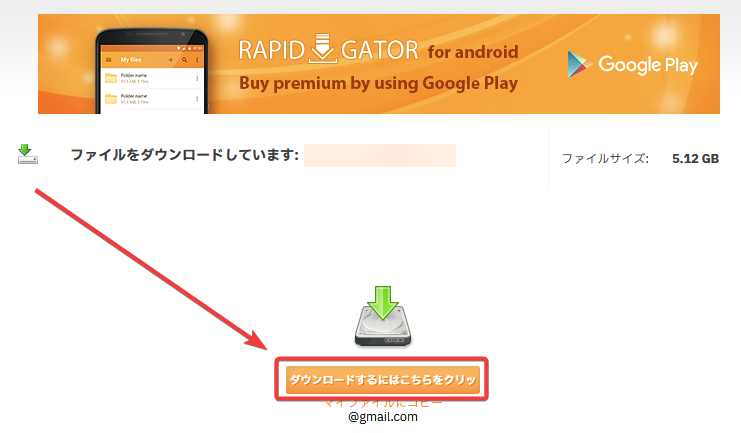
Opening the link shows the download page.
Click the download button.
The download starts.
How to Enable Direct Download
With direct download enabled, clicking a link starts the download right away, without opening the “Rapidgator” download page.
Enabling it makes downloading far more efficient.
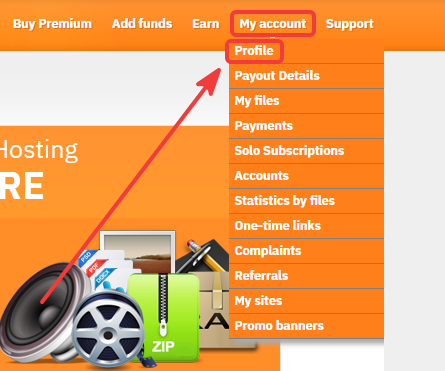
Click “My account“, then “Profile“.
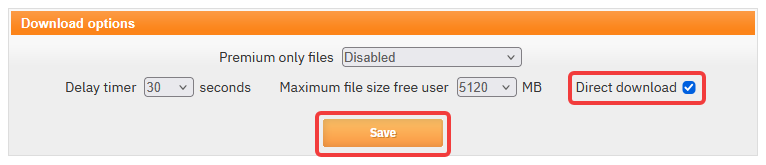
Under “Download options“, check “Direct download” and click “Save“.
Direct download is now enabled.
Recommended Tools for File Hosting Services
When you use a file hosting service, your IP address is passed directly to the other party’s server, so it is worth taking security measures as well.
Also, a dedicated download tool is far more efficient than downloading in your browser.
If you find it tedious to click the download button and wait every time, or feel uneasy about using overseas sites as they are, see “Recommended Tools for File Hosting Services“. It summarizes the standard tools that heavy users rely on, organized by purpose.

Watch Out for rapidgators.net
“rapidgators.net” looks like the official site of “rapidgator.net” at first glance, but it is actually run by a completely different operator.
To avoid paying for Premium on the wrong site by mistake, always check that the URL is correct before you use the site or make a payment.
For details, see “Warning: rapidgators.net Is a Fake Site – How to Spot the Official Rapidgator URL“.
How to Cancel Premium and Stop Auto-Renewal
“Rapidgator” Premium plans have auto-renewal turned on by default.
However, you can stop (cancel) auto-renewal at any time from your account settings, which prevents unintended recurring charges.
The exact steps for stopping auto-renewal, and what happens to your remaining period after you cancel, are explained with screenshots in “How to Cancel Rapidgator Premium: Steps to Stop Auto-Renewal“.
Frequently Asked Questions (FAQ)
What If I Can’t Download, It’s Slow, or I Get an Error?
In most cases the download has stopped because of a free-account limit (quota exceeded), a temporary server error, or a Rapidgator-specific feature such as “SoloSubscriptions”.
Causes and fixes for common problems, such as “slow even with Premium”, “Error 500”, and “SoloSubscriptions is displayed”, are explained in “Rapidgator Not Downloading or Slow? Causes and Fixes, Including Error 500 and SoloSubscriptions“. If you are stuck on an error, please refer to it.
What Is the Best Way to Buy? Can I Use PayPal, V-Preca, or PayPay?
Buying Rapidgator Premium through “Preaka.JP”, an authorized reseller in Japan, is a reliable route that keeps fees low.
Some overseas resellers accept PayPal, but we do not recommend them because their fees are high and problems are common. “Preaka.JP” does not accept PayPal, but it offers V-Preca, PayPay balance, Google Pay, and other safe Japanese payment methods that do not require a credit card.
For those without a credit card, how to buy with prepaid cards sold at convenience stores in Japan (Vanilla Visa, Bandle Card, PayPay Balance Card, V-Preca Gift) is covered in “How to Buy File Host Premium Without a Credit Card“.
Common pre-purchase questions, such as the cheapest way to buy, how to choose a safe reseller, and the trap of discount coupons found online, are covered in “Rapidgator Premium Payment Methods: How to Buy Safely with PayPal, V-Preca or PayPay“.
Is There a Daily Download Limit (Bandwidth)?
For Premium members, there is no daily limit.
For example, even if you download more than 500GB in a single day, you will not hit a limit.
Does Used-Up Bandwidth Come Back?
Yes. The timing is random, but it is sometimes restored automatically.
Users have reported cases where their bandwidth had been reset to the maximum “about a week later” or “after leaving the account alone for several days”. It is unclear whether this is intended behavior or a bug, and you cannot trigger it yourself.
▼ How to check your remaining bandwidth
You can check the current amount, and whether it has been reset, under available bandwidth on your profile page.
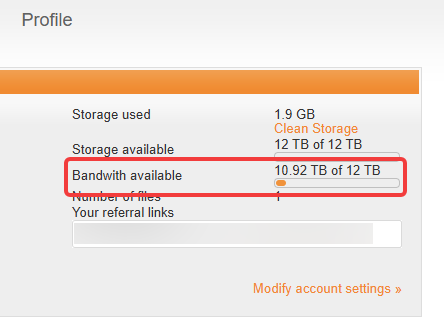
If you happen to check and find it restored to the maximum, consider yourself lucky.
How Fast Are Premium Downloads?
It depends on your environment, but we measured speeds of 20–50MB/s.
It varies somewhat by time of day, but this is among the fastest of all file hosts. The image below shows the speed (about 50MB/s) during an actual download with the external tool JDownloader2.
Are Free PLGs Safe?
We do not recommend them at all. The risk of malware and scams is high.
A PLG is an unofficial way of trying to use Premium features for free, but at present there is no safe PLG that works properly with Rapidgator.
- Main risks: infection with viruses or malware, forced redirects to scam sites, and hitting bandwidth limits so quickly that downloading is practically impossible
Considering account safety and download speed, buying a Premium account through an official route is the most reliable and least stressful choice in the end. Buying through official routes also helps keep a useful service like Rapidgator running for the long term.
How Do I Contact Official Support?
You can email official customer support directly at help@rapidgator.net.
Support is handled in English. Putting your account name and a short summary of the problem in the subject line helps them respond smoothly.
Replies usually take three days to a week (longer when they are busy). They do reply properly, so the key is to wait patiently.
Is It True That Files Get Uploaded Without My Knowledge?
No. Rapidgator never uploads anything on its own.
That rumor comes from confusion with P2P software such as torrents, where users’ computers send and receive data with each other. Rapidgator only saves data one way, from the server to your computer (the same mechanism as YouTube or Google Drive), so there is no risk of unintentionally becoming a distributor of files.
Note: even though the system itself is safe, be careful about what you download and make sure it is not an illegal file.
Is Rapidgator Illegal? Is It Safe to Use?
Rapidgator itself is a legitimate cloud storage service, and the service itself is not illegal.
However, depending on how you use it, your use may be illegal.
- Examples of illegal acts: uploading copyrighted content (movies, music, books, and so on) without permission, or downloading it while knowing that it was uploaded illegally.
These acts violate copyright law, and the user may be held legally responsible. Laws differ by country, so check the rules where you live. The service itself is safe to use, but never touch illegal files, and follow the rules.
Summary: Comfortable Downloads with Rapidgator
“Rapidgator” is a popular service that combines fast downloads, large storage, and many years of operation, even among the many file hosts available.
The steps from creating an account to going Premium are simple, and even beginners can use it intuitively.
If you run into trouble later, such as not knowing which payment method to choose or a download stopping with an error, make full use of the FAQ in this article and our dedicated guides (purchase and payment, troubleshooting).
If anything is still unclear after reading, feel free to ask in the comment section at the bottom. We will answer as best we can.
If you have not tried Premium yet, give it a go and see how comfortable it is.
Official site: Rapidgator








コメント